In 2025, the simple act of taking notes has transformed. It’s no longer about transcribing what you hear; it's about instantly turning information into actionable insights, structured summaries, and even published content. The best AI note taking app doesn't just record information; it understands, organizes, and creates for you. This shift is crucial for anyone looking to reclaim their time and focus on what truly matters.
This guide cuts through the noise to compare the top 12 AI-powered note-taking solutions. We move beyond generic feature lists to provide a detailed, comparative analysis of platforms like Notion, Obsidian, Evernote, and industry-specific tools such as Otter.ai. Each review includes screenshots and direct links, so you can see the tools in action.
Whether you're a project manager drowning in back-to-back meetings, a content creator aiming to streamline production, or a student needing smarter study aids, the right AI tool can redefine your workflow. We'll explore specific use cases, from automatically generating meeting minutes with a tool like Notize AI to summarizing lengthy YouTube lectures.
Our analysis will also highlight how integrated solutions like Notize AI are specifically engineered for team collaboration, offering automated transcription, intelligent summaries, and analytics to turn raw meeting data into a searchable knowledge base. By the end of this article, you will have a clear understanding of which platform best fits your unique needs, helping you choose the ideal app to enhance your productivity and organization.
1. Notize AI
Notize AI establishes itself as a powerful, all-in-one content engine, positioning it as a top contender for the best ai note taking app for creators, professionals, and students who need to do more than just transcribe. It’s designed not just to capture information but to transform raw media—audio, video, URLs, and documents—into structured, searchable, and shareable assets. This platform excels at bridging the gap between passive recording and active intelligence, making it an indispensable tool for teams focused on productivity and content creation.
The core strength of Notize AI lies in its unified workflow. Instead of juggling separate tools for transcription, summarization, and content creation, users manage everything from a single, intuitive dashboard. This integrated approach is a significant advantage for content managers, marketing teams, and project leads who can take a Zoom meeting recording, instantly generate an accurate transcript with speaker labels, and then, with a few clicks, produce a concise summary, a list of action items, and even a draft for a blog post.
Notize AI also provides built-in analytics, a feature that distinguishes it from many competitors. This allows creators to track engagement with published notes or content, offering data-driven insights to refine communication strategies. For marketers, this means understanding which topics resonate most with their audience, directly from the content they’ve processed with Notize AI.
Key Features & Use Cases
For teams in meetings: Record meetings directly in the app. Notize AI automatically produces a full summary, key discussion points, speaker-attributed notes, action items, and a timeline of important moments. Users can search across all past meetings and jump to the exact moment a topic was discussed, ensuring everyone has a clear understanding without manual note-taking.
For journalists and creators: Upload audio or video to generate high-quality transcriptions and customizable blog posts in any writing style. With Notize AI, you can build and publish to your own blog, access content analytics, and use AI to suggest more compelling wording and storytelling techniques.
For content consumers: Send links from YouTube, Facebook, Instagram, or TikTok. Notize AI processes the media to provide instant summaries, insights, and repurposed content like step-by-step guides from tutorial videos. You can even chat with the AI to ask questions about the video without watching it.
For students: Record lectures or upload class materials (including PDFs, PowerPoints, and ebooks). Notize AI will transcribe, analyze, and convert them into summaries, study guides, or simplified explanations. Students can ask the AI specific questions and instantly jump to the moment a topic was explained.
Best For: Teams and individuals who need a comprehensive solution to capture, analyze, repurpose, and measure the impact of their spoken and video content. It is particularly effective for content marketers, project managers, and media creators.
Pricing
Notize AI offers a tiered pricing model that accommodates a range of users:
Starter: Free. Allows processing of up to 5 items, providing a solid trial of the core features.
Growth: $15/month. Unlocks unlimited content processing, exports, storage, and priority support.
Enterprise: $100/year. An annual plan offering significant value for consistent users and teams.
While the platform is incredibly robust, organizations with stringent security and compliance requirements should note the absence of explicit certifications like SOC 2 on the website and may need to conduct their own due diligence. The free plan's 5-item limit is also a key consideration for those evaluating the service.
Learn more at notize.ai
2. Notion
Notion has evolved from a powerful note-taking and database tool into an all-encompassing workspace with Notion AI integrated directly into its core functions. It stands out as a top contender for the best AI note taking app because it combines document creation, project management, and knowledge bases into a single, unified environment. This structure allows teams to not only capture notes but also connect them directly to tasks, wikis, and project timelines.
What makes Notion unique is its block-based editor and powerful database capabilities. Users can build anything from a simple to-do list to a complex CRM, all within the same platform. With Notion AI, you can summarize lengthy meeting notes, automatically generate action items from a block of text, or use its autofill feature to populate database properties based on existing content. This AI layer streamlines workflows that would otherwise require manual data entry and synthesis.
Key Takeaway: Notion is the ideal choice for users who want to build a centralized, interconnected system for all their work-not just their notes. It serves as a comprehensive knowledge management system where AI enhances existing documents and databases.
Key Features and Pricing
Notion AI: Provides summarizing, writing assistance, and database autofill.
Databases: Create highly customizable tables, boards, and galleries to organize anything.
Templates: A vast library of pre-built templates for notes, projects, and wikis.
Collaboration: Real-time editing, comments, and page sharing for team-based work.
Pricing: While Notion has a free personal plan, the full suite of Notion AI features is now part of the Business Plan ($18/user/month) or higher for new customers. An AI add-on is available for other plans at $8/member/month.
Pros and Cons
Pro: Its incredible flexibility allows it to adapt to nearly any workflow, from solo creators to large enterprises.
Con: The platform has a significant learning curve, especially when mastering its database and relational features.
Pro: Excellent cross-platform support ensures a seamless experience across web, desktop, and mobile.
Con: Unlike dedicated meeting tools such as Notize AI, it lacks real-time transcription and speaker identification, requiring manual input for meeting captures.
Official Website: https://www.notion.so/pricing
3. Microsoft OneNote (Microsoft 365 Copilot)
Microsoft OneNote becomes a powerful AI-driven tool when integrated with Microsoft 365 Copilot. For users deeply embedded in the Microsoft ecosystem, this combination positions it as a strong candidate for the best AI note taking app by connecting notes directly with documents, emails, and presentations. Copilot leverages your entire Microsoft 365 data to provide contextually aware assistance, making OneNote more than just a digital notebook.
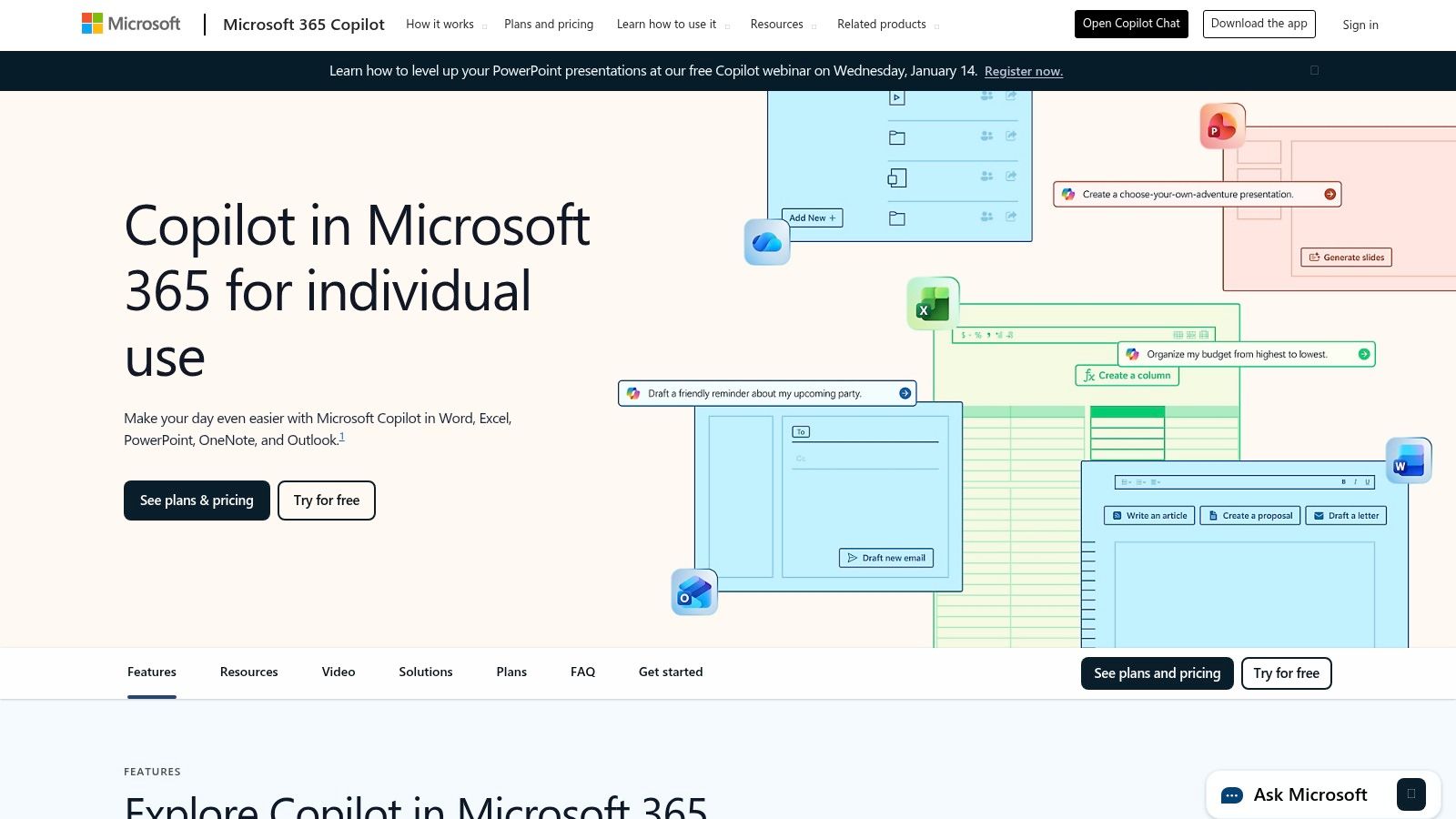
The primary advantage is its seamless integration across Office apps. You can ask Copilot to summarize meeting notes from a Teams call directly within OneNote, draft a plan based on an Outlook email thread, or create to-do lists from a brainstorming session. This unified experience is ideal for professionals who need AI to work across their entire software suite, not just within a single note-taking application.
Key Takeaway: OneNote with Copilot is the best choice for individuals and teams already committed to the Microsoft 365 suite. Its strength lies in its ability to leverage data from Outlook, Teams, Word, and Excel to create, summarize, and organize notes intelligently.
Key Features and Pricing
Copilot Integration: AI assistance for summarizing, drafting, and creating plans across the M365 suite.
Meeting Notes: Automatically generate meeting notes, action items, and summaries from Microsoft Teams meetings.
Drafting Assistance: Use Copilot to create outlines, lists, and entire sections of text based on simple prompts.
Enterprise Security: Benefits from Microsoft's robust security and compliance features, making it suitable for corporate use.
Pricing: Copilot is available as an add-on for Microsoft 365 Business Standard/Premium plans at $30/user/month (with an annual commitment). For personal use, it's included in Microsoft 365 Copilot Pro for $20/month.
Pros and Cons
Pro: Deep, native integration with the entire Microsoft 365 ecosystem offers unparalleled workflow continuity for Office users.
Con: Its AI capabilities are heavily dependent on your data residing within the Microsoft environment, limiting its utility for external content.
Pro: Enterprise-grade security and data privacy are built-in, providing a secure environment for sensitive corporate information.
Con: Unlike specialized tools such as Notize AI that focus on transcribing and analyzing media from any source, Copilot's functionality is less flexible for processing external audio or video files.
Official Website: https://www.microsoft.com/en-us/microsoft-365-copilot/personal
4. Evernote
Evernote is a long-standing veteran in the digital note-taking space that has recently integrated AI to modernize its robust platform. As a contender for the best AI note taking app, it excels at capturing information in diverse formats, from text and audio to web clippings and scanned documents. Its core strength lies in its powerful organization and mature search capabilities, making it a reliable digital filing cabinet for all of your information.
The recent introduction of AI features, such as AI-powered search and AI Note Cleanup, enhances its traditional note-taking functionality. AI-powered search allows users to ask questions in natural language to find notes, while the cleanup feature automatically formats messy text, fixes typos, and adds structure. These additions streamline the process of organizing and retrieving information, building upon the platform's already powerful feature set without complicating the user experience.
Key Takeaway: Evernote is ideal for users who need a powerful, multi-format capture tool combined with a reliable organizational system. Its new AI features enhance its core mission: to help you remember everything by making your notes more searchable and organized.
Key Features and Pricing
AI-Powered Search: Ask questions in natural language to find relevant notes without keyword matching.
AI Note Cleanup: Automatically formats notes, fixes typos, and creates summaries or key takeaways.
Versatile Capture: Includes a web clipper, document scanner, and audio recording capabilities.
Tasks & Calendars: Integrates to-do lists and Google Calendar to connect notes with your schedule.
Pricing: Evernote offers a limited free plan. The Personal plan is $14.99/month, and the Professional plan is $18.99/month, with both required for full access to its AI features and advanced capabilities.
Pros and Cons
Pro: Its powerful capture tools, including the best-in-class web clipper and document scanner, are unmatched.
Con: The app can feel heavy and less nimble compared to newer, more minimalist alternatives.
Pro: A mature and stable platform with excellent cross-device synchronization and a long track record of reliability.
Con: While its AI is useful for cleanup and search, it lacks the real-time transcription and generative AI meeting summary features found in dedicated tools like Notize AI.
Official Website: https://evernote.com/
5. Obsidian
Obsidian positions itself not just as a note-taking app, but as a "second brain" that prioritizes user control, privacy, and endless customization. It operates on a local-first model, meaning all your notes are stored as plain Markdown files on your device. This makes it a strong contender for the best AI note taking app for users who value data ownership and want to build a truly personal knowledge base without relying on cloud services.
What makes Obsidian unique is its powerful community-driven plugin ecosystem. While Obsidian itself does not have native AI, users can integrate powerful AI capabilities through third-party add-ons like Copilot for Obsidian or various GPT-based plugins. These tools allow you to chat with your notes, generate summaries, and automate writing tasks directly within your vault, giving you AI assistance while keeping your data private and secure on your own machine.
Key Takeaway: Obsidian is the ultimate choice for privacy-conscious users and tinkerers who want to build a deeply interconnected and fully customized note-taking system. Its offline-first approach and plugin flexibility offer unparalleled control.
Key Features and Pricing
Local-First Markdown Files: You own your data completely; notes are stored in a future-proof format on your device.
Graph View: Visually explore the connections between your notes to uncover new insights.
Extensive Plugin Ecosystem: Add functionalities like AI assistants, calendars, and advanced tables.
End-to-End Encrypted Sync: Optional paid service to securely sync your vault across devices.
Pricing: Obsidian is free for personal use. Optional add-on services include Sync ($8/month) and Publish ($16/month). AI features depend on third-party plugins, which may require separate API keys or subscriptions.
Pros and Cons
Pro: Complete data ownership and privacy since files are stored locally, not on a company's server.
Con: Setting up AI requires technical comfort with installing plugins and managing API keys from external services.
Pro: Its extreme customizability allows you to build a note-taking system perfectly tailored to your workflow.
Con: Unlike automated tools such as Notize AI that capture and summarize meetings instantly, Obsidian requires manual input and setup to process similar information.
Official Website: https://obsidian.md/
6. Mem
Mem distinguishes itself with an AI-first approach centered on rapid capture and intelligent retrieval. Marketed as a self-organizing workspace, it uses AI to connect and surface information from your notes and integrated sources automatically. This makes it a strong candidate for the best AI note taking app for individuals who prioritize speed and a low-friction experience, allowing users to build a personal knowledge base that thinks and connects ideas alongside them.
Unlike platforms that bolt AI onto existing structures, Mem is built around its AI chat and search capabilities. Users can ask questions in natural language and receive synthesized answers pulled from their entire collection of notes, emails, and calendar events. This chat-based interaction with your own knowledge removes the need for manual tagging or complex folder hierarchies, as the AI understands the context and relationships between different pieces of information.
Key Takeaway: Mem is ideal for users who need a "second brain" that requires minimal organization. Its AI-powered search and chat functions make it perfect for quickly retrieving forgotten ideas, connections, and details without manual effort.
Key Features and Pricing
AI Chat & Search: Ask questions and get answers synthesized from your personal notes and data.
Automatic Organization: AI automatically links related notes, creating an interconnected knowledge graph.
Integrations: Connects with Google Calendar, Gmail, and other sources to build a more complete memory.
Fast Capture: Designed for quick entry of thoughts and ideas through a streamlined interface.
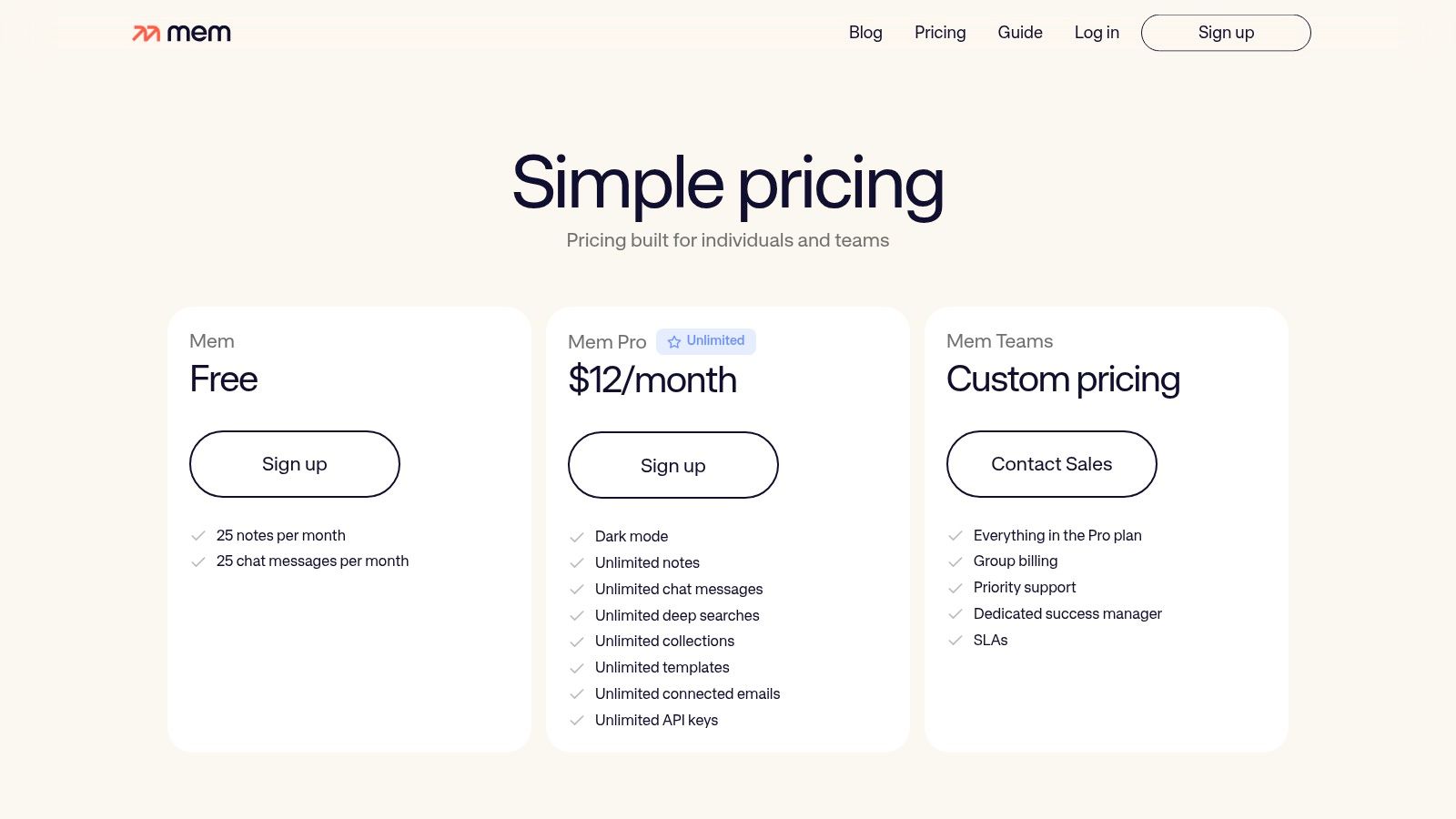
Pricing: Mem offers a free plan with limits on AI usage. The Mem X plan, which unlocks unlimited AI features and advanced capabilities, costs $10/month when billed annually.
Pros and Cons
Pro: The minimal setup and AI-driven organization make it incredibly fast to capture and retrieve notes.
Con: As a newer platform, its ecosystem and feature set are less extensive than more established competitors.
Pro: Excellent for building a personal knowledge base or for use by individuals and lightweight teams.
Con: Lacks the dedicated, automated meeting capture features of tools like Notize AI, such as real-time transcription and speaker-attributed summaries.
Official Website: https://get.mem.ai/pricing
7. Tana
Tana takes a unique, networked approach to note-taking, treating every piece of information as an interconnected "node." It has rapidly gained a following as a contender for the best AI note taking app for users who thrive on structure and interconnected knowledge. Instead of traditional documents, Tana organizes information in a dynamic graph, making it incredibly powerful for building a personal knowledge base where ideas are linked and contextualized.
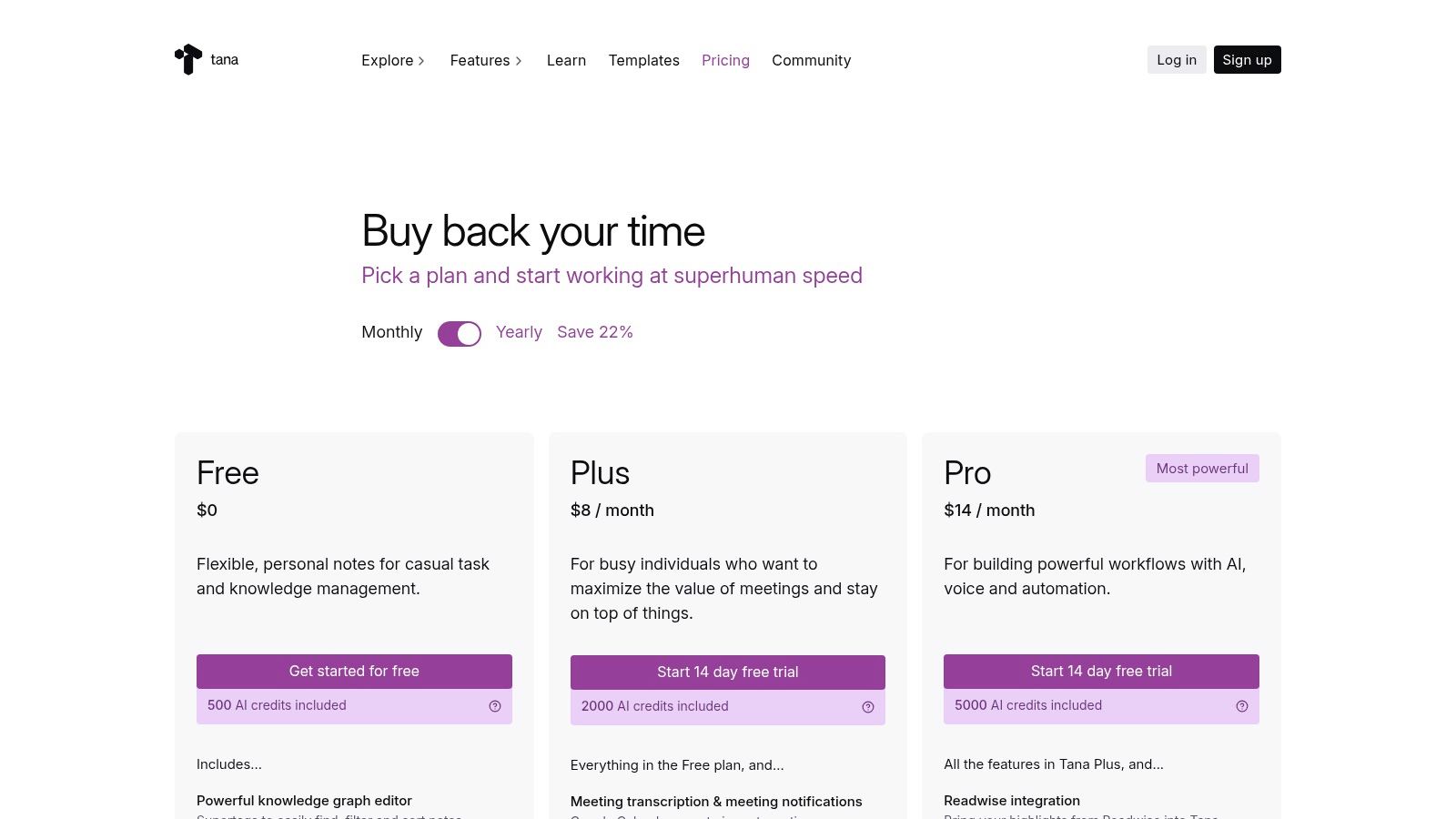
Its AI implementation is built directly into this nodal system, allowing users to run complex commands and workflows on their notes. You can use its built-in AI credits to transcribe voice memos, summarize meeting notes, generate content, or automate data entry across your entire graph. This makes it ideal for researchers, academics, and power users who want to not only capture information but also actively process and connect it using AI agents.
Key Takeaway: Tana is designed for structured thinkers who want to build a "second brain" where AI agents can work on a highly organized network of notes. It excels at creating relationships between disparate pieces of information.
Key Features and Pricing
Networked Nodes: Organizes all information as interconnected nodes, creating a powerful knowledge graph.
Built-in AI Credits: Plans include a set number of AI credits for using models to transcribe, summarize, and generate content.
Voice Memos & AI Transcription: Capture ideas on the go and have Tana’s AI automatically transcribe and structure them.
Integrations: Connects with tools like Google Calendar and Readwise to pull external information into your Tana graph.
Pricing: Tana offers a free plan with limited AI credits. The Tana Pro plan is priced at $13/month and includes a generous allotment of AI credits, collaboration features, and API access.
Pros and Cons
Pro: Its networked structure is exceptionally powerful for building and navigating complex, linked knowledge systems.
Con: The AI credit system and its limits can be confusing for new users to understand and manage effectively.
Pro: The platform is under active development, with a clear roadmap and transparent guidance on how AI features work.
Con: Unlike Notize AI, which offers unlimited meeting analysis on its plans, Tana's AI capabilities are tied to a credit system, and the most powerful features are reserved for paid tiers.
Official Website: https://tana.inc/pricing
8. Craft
Craft is a beautifully designed document and note-taking app that prioritizes a polished user experience and visual appeal. It positions itself as a strong contender for the best AI note taking app for users who value aesthetics, structured documents, and flexible AI implementation. Unlike tools built around plain text, Craft excels at creating visually rich documents that can be easily shared or exported as stunning web pages or PDFs.
Its AI Assistant is integrated directly into the editor, allowing users to generate text, summarize notes, brainstorm ideas, or translate content on the fly. What makes Craft unique is its hybrid AI model. It offers a credit-based system for accessing powerful cloud-based AI, but also supports on-device models for users who prioritize privacy and offline access, making it a versatile choice for different needs.

Key Takeaway: Craft is the perfect choice for individuals and teams who want to create beautiful, well-structured documents with the help of AI, without sacrificing design or presentation quality.
Key Features and Pricing
AI Assistant: Offers text generation, summarization, and editing with cloud or on-device models.
Cross-Platform Apps: Provides a seamless experience across macOS, iOS, Windows, and Web.
Collaborative Spaces: Allows teams to work together in shared folders with real-time editing.
Polished Editor & Export: Creates visually appealing documents with robust export options.
Pricing: Craft offers a free plan with limited AI credits. The Pro plan ($10/month) includes a generous monthly allowance of AI credits, with options to purchase more if needed.
Pros and Cons
Pro: Its high-quality editor and beautiful presentation options make it ideal for public-facing documents.
Con: The AI credit system can be confusing to manage compared to unlimited plans.
Pro: The flexible AI model (cloud vs. on-device) caters to both power users and privacy-conscious individuals.
Con: It lacks deeper knowledge management features like the relational databases in Notion or the real-time meeting transcription found in tools like Notize AI.
Official Website: https://www.craft.do/pricing
9. Otter.ai
Otter.ai specializes in turning spoken conversations into smart, actionable notes, making it a powerful contender for the best AI note taking app for meeting-heavy professionals. It functions as an AI meeting assistant that can join calls on Zoom, Google Meet, and Microsoft Teams, providing real-time transcription and allowing participants to focus on the conversation instead of manual note-taking. The platform excels at capturing audio and converting it into structured, searchable text.
What makes Otter.ai stand out is its dedicated focus on automating meeting documentation from start to finish. The "OtterPilot" feature can automatically join scheduled meetings, record audio, and generate a detailed summary with an outline, action items, and key takeaways moments after the call ends. This hands-off approach is ideal for teams that need consistent and accurate records of every discussion without adding to anyone's workload.
Key Takeaway: Otter.ai is the perfect solution for users whose primary note-taking need is capturing verbatim details from meetings and lectures. It transforms audio into a rich, interactive transcript enhanced with AI-driven summaries and action items.
Key Features and Pricing
Live Transcription: Provides real-time, speaker-identified transcription during meetings.
OtterPilot: An AI meeting agent that automatically joins, records, and summarizes your calendar events.
AI Summaries & Action Items: Automatically generates concise summaries, outlines, and checklists from transcripts.
Collaboration: Users can highlight text, add comments, and share notes with teammates directly within the transcript.
Pricing: Otter.ai offers a free plan with limited transcription minutes. Paid plans start with the Pro plan at $10/user/month (billed annually), which offers more minutes and features. A Business plan at $20/user/month adds team-focused capabilities.
Pros and Cons
Pro: Excellent for lecture- and meeting-heavy workflows, offering one of the best automated transcription services on the market.
Con: Its general note-taking and text-editing features are basic compared to all-in-one workspaces.
Pro: The hands-off capture via OtterPilot and deep integrations with conferencing tools provide a seamless user experience.
Con: While powerful for audio, it lacks the multi-modal capabilities of tools like Notize AI, which can process videos, documents, and web content in addition to audio.
Official Website: https://otter.ai/pricing-2025
10. Goodnotes
Goodnotes has long been a favorite for digital handwriting, and its recent integration of AI features solidifies its place as a top-tier tool, especially for tablet users. It excels in transforming handwritten notes into smart, searchable content, making it a strong candidate for the best AI note taking app for students, academics, and professionals who prefer the feel of pen on paper. The app’s strength lies in its ability to understand and augment handwritten text, a feature many keyboard-first apps lack.
What sets Goodnotes apart is its focus on enhancing the handwritten note-taking process with practical AI. Features like Spellcheck for handwriting correct mistakes without forcing you to erase and rewrite. More advanced tools allow you to ask questions about your notes, generate study sets, and even get help with complex math equations directly from your written input. This turns your static notes into an interactive study and review partner.
Key Takeaway: Goodnotes is the ideal choice for users who primarily take handwritten notes on a tablet and want AI-powered tools to help them study, review, and perfect their work. It bridges the gap between traditional note-taking and modern AI assistance.
Key Features and Pricing
AI Handwriting Features: Includes Spellcheck and Word Complete for handwritten text.
AI Typing: Offers summarizing, text shortening, and tone changing for typed notes.
Interactive Exam Prep: Create AI-generated quizzes and practice tests from your notes.
AI Math Assistance: Helps identify errors and solve math problems written by hand.
Pricing: Goodnotes offers a limited free version. The full version is a one-time purchase of $29.99. The AI features are part of a separate subscription and are not included in the standard one-time purchase.
Pros and Cons
Pro: The handwriting experience is exceptionally fluid and responsive, closely mimicking real pen and paper.
Con: The full AI feature set requires an additional subscription, separating it from the core app purchase.
Pro: AI-powered study tools are incredibly useful for students preparing for exams.
Con: It lacks the real-time transcription and speaker identification found in meeting-focused tools like Notize AI, making it less suitable for capturing live discussions automatically.
Official Website: https://www.goodnotes.com/pricing
11. Apple App Store (Note‑taking apps)
While not a note-taking app itself, the Apple App Store is an essential gateway for anyone on an iPhone, iPad, or Mac looking for the best AI note taking app. It serves as the primary marketplace to discover, compare, and securely download a vast array of applications, including top-tier options like Notability, Goodnotes, and Craft. Its value lies in centralizing the entire app ecosystem, from installation and updates to subscription management.
The App Store stands out for its editorial curation and user-centric features. Apple’s editors often feature collections like ‘Best Note-Taking Apps,’ which can introduce users to powerful new tools enhanced with AI. Furthermore, every app page includes user ratings, detailed privacy labels, and a streamlined process for handling subscriptions and in-app purchases. This provides a safe and reliable environment to explore different AI note-taking solutions before committing.
Key Takeaway: The Apple App Store is the most convenient and secure starting point for Apple device users to find and manage the top AI-powered note-taking apps, ensuring a vetted and integrated experience.
Key Features and Pricing
Centralized Discovery: Access and download a wide range of iOS, iPadOS, and macOS note-taking apps.
Editorial Collections: Curated lists and stories that highlight innovative and trending AI note apps.
Unified Billing: Manage all app subscriptions and in-app purchases in one place, with Family Sharing options.
User Ratings and Privacy Labels: Provides transparency into app quality and data handling practices.
Pricing: The App Store itself is free to use. App prices vary, with many offering free downloads and in-app subscriptions for premium AI features.
Pros and Cons
Pro: The safest and most convenient way to install and manage apps on Apple devices.
Con: Exclusively for Apple users; it does not serve Android or Windows platforms.
Pro: Easy subscription and trial management makes it simple to test different applications.
Con: App pricing and feature availability through in-app purchases can vary by region.
Official Website: https://apps.apple.com/us/story/id1655030231
12. G2 (Note‑Taking Software category)
While not a note-taking app itself, G2 is an essential research platform for anyone serious about finding the best AI note taking app for their specific needs. It functions as a comprehensive software marketplace that aggregates thousands of real user reviews, ratings, and feature comparisons. This allows you to get a broad, unbiased view of the market and see how different tools stack up against each other based on authentic user feedback.
G2's value lies in its powerful filtering and comparison tools. You can narrow down the vast list of note-taking software by company size, pricing models, specific features like AI summarization, and user satisfaction scores. Instead of relying solely on marketing copy, you can read detailed reviews from peers in similar industries, helping you identify potential strengths and weaknesses that vendors might not advertise. It's the ideal starting point to create a shortlist before committing to trials.
Key Takeaway: G2 is the ultimate research tool for making an informed decision. Use it to validate claims, compare top contenders side-by-side, and discover new or niche applications you might have otherwise missed.
Key Features and Pricing
Aggregated User Ratings: Access authentic reviews and satisfaction scores from a massive user base.
Advanced Filtering: Sort options by price, business size, user ratings, and specific software features.
Direct Vendor Links: Easily navigate to official product pages, pricing information, and free trial sign-ups.
Peer Comparisons: See how leading tools are rated against each other in head-to-head comparisons.
Pricing: G2 is completely free to use for browsing, reading reviews, and comparing software.
Pros and Cons
Pro: Provides a broad, unbiased landscape view that is invaluable for initial research and shortlisting candidates.
Con: Sponsored placements and vendor-influenced content can sometimes appear, requiring careful discernment.
Pro: Recent user feedback offers up-to-date insights on software performance and customer support quality.
Con: It is a marketplace, not a direct seller. You must navigate to individual vendor sites to purchase or subscribe.
Official Website: https://www.g2.com/categories/note-taking-software
Top 12 AI Note‑Taking Apps Comparison
Product | Core features | UX & Quality (★) | Value & Pricing (💰) | Target audience (👥) | Unique selling points (✨) |
|---|---|---|---|---|---|
Notize AI 🏆 | Transcription (YouTube/Zoom/Meet/Teams), searchable media library, summaries, action items, analytics, exports | ★★★★☆ Fast, accurate, secure processing | 💰 Free Starter (5 items); Growth $15/mo (unlimited); Enterprise annual $100/yr | 👥 Content managers, product teams, marketers, podcasters, CS | ✨ Centralizes media→insights→publish; built-in analytics & export workflow |
Notion | Docs + databases, Notion AI (writing, summaries), templates, enterprise search | ★★★★☆ Strong collaboration; flexible but steeper learning | 💰 Freemium; full Notion AI on Business/Enterprise | 👥 Teams, knowledge workers, product & content teams | ✨ All-in-one wiki/DBs with integrated AI writing |
Microsoft OneNote (Copilot) | Copilot across Word/Excel/PowerPoint/Outlook/OneNote; AI summaries/action items; monthly AI credits | ★★★★☆ Deep Office integration; enterprise-grade security | 💰 Included with M365 Copilot (credits); higher cost vs legacy plans | 👥 Enterprise/Office-centric teams | ✨ Native Office ecosystem + compliance & admin controls |
Evernote | AI assistant, semantic search, document scanning, audio capture, web clipper | ★★★☆☆ Mature, robust capture & search | 💰 Freemium; v11 Starter/Advanced; paid upgrades for heavy users | 👥 Individuals & teams needing scanning and archival | ✨ Best-in-class scanning + long-standing search features |
Obsidian | Local Markdown vault, plugin ecosystem, optional Obsidian Sync (E2EE), 3rd‑party AI add-ons | ★★★☆☆ Highly customizable; requires tinkering | 💰 Free personal use; paid Sync/Publish services | 👥 Privacy-focused users, PKM enthusiasts, power users | ✨ Local-first data ownership + extensible plugins |
Mem | AI search/chat, auto-organization, templates, integrations (email/API) | ★★★☆☆ Fast capture & retrieval; AI-first UX | 💰 Freemium with limits; team plans available | 👥 Individuals & small teams focused on personal KB | ✨ Auto-organization + conversational retrieval |
Tana | Networked nodes, AI agents, voice memos/transcription, integrations, AI credits | ★★★☆☆ Powerful for linked knowledge; learning curve | 💰 Paid plans with AI credits | 👥 Knowledge builders, power users, researchers | ✨ Structured node graph + meeting AI agents |
Craft | Polished editor, AI assistant (cloud credits or on-device), collaborative spaces, exports | ★★★★☆ Beautiful editor; polished UX | 💰 Paid plans; AI cloud credits or on-device option | 👥 Creatives, doc authors, teams wanting great exports | ✨ High-quality editor + flexible on-device AI for privacy |
Otter.ai | Live transcription, AI summaries, action items, AI Meeting Agent, conferencing integrations | ★★★★☆ Excellent transcription for meetings | 💰 Freemium; minutes/limits vary by plan | 👥 Meeting-heavy teams, educators, researchers | ✨ Hands-off audio capture + auto-join meeting agent |
Goodnotes | Handwriting-first, handwriting recognition, audio recording + transcription, AI Q&A/math, AI Pass | ★★★★☆ Best handwriting experience on tablets | 💰 App + subscription options; optional AI Pass | 👥 Students, tablet note-takers, stylus users | ✨ Best-in-class handwriting + AI study tools |
Apple App Store (Note apps) | Discovery, editorial collections, centralized billing & privacy labels | ★★★☆☆ Convenient for Apple ecosystem | 💰 Free to browse; app/IAP prices vary by developer/region | 👥 iOS/macOS users seeking note apps | ✨ Curated collections & centralized subscription management |
G2 (Note‑Taking category) | Aggregated reviews, filters, feature comparisons, buyer feedback | ★★★☆☆ Useful for shortlisting; includes badges & rankings | 💰 Free research; links to vendor sites | 👥 Buyers researching software & procurement teams | ✨ Crowd-sourced reviews, trending badges & side‑by‑side filters |
Finding Your Perfect AI Note-Taking Partner
Navigating the landscape of AI-powered productivity tools can feel overwhelming, but the journey to find the best AI note taking app for your unique workflow is a worthy investment. We've explored a wide spectrum of options, from the all-encompassing digital workspaces of Notion and Microsoft 365 Copilot to the deeply personal and customizable knowledge graphs of Obsidian and Tana. Each tool offers a distinct philosophy on how to capture, organize, and interact with information.
The core takeaway is that the "best" app is not a one-size-fits-all solution. It's a deeply personal choice contingent on your primary use case. Are you a meticulous planner who thrives on building interconnected databases and custom dashboards? Tools like Notion or Craft might be your ideal match. Do you prioritize data privacy and offline access above all else? The local-first architecture of Obsidian provides an unparalleled sense of ownership and control. For those already embedded in the Microsoft ecosystem, the integrated power of Copilot within OneNote presents a seamless, low-friction entry into AI-enhanced note-taking.
How to Choose Your Ideal Tool
Making the right choice requires a clear understanding of your daily information bottlenecks. Before committing, ask yourself these critical questions:
What is my primary input source? Do I mostly type text, or do I need to process audio from meetings, video from lectures, or content from social media links? This is a crucial differentiator. While many apps are adding AI to text, platforms like Notize AI and Otter.ai are purpose-built for media-rich inputs.
What is my desired output? Am I simply trying to organize my thoughts, or do I need to generate structured summaries, assign action items, or even create polished, publishable content like blog posts? The ability to transform raw data into a final product is a key feature of advanced AI tools like Notize AI.
How important is collaboration? Do I work alone, or do I need to share meeting notes, distribute tasks, and provide a single source of truth for my entire team? This will guide you toward platforms with robust sharing, permissions, and team-centric features. Notize AI, for example, excels at turning a single meeting recording into a shareable asset with clear summaries and action items for everyone involved.
What is my tolerance for setup and customization? Are you willing to invest time building a system from scratch (like in Obsidian or Tana), or do you need a tool that delivers value immediately with minimal configuration?
The Shift from Note-Taking to Information Transformation
The evolution we're witnessing is a fundamental shift from passive note storage to active information processing. The most powerful AI note-taking apps no longer just hold your ideas; they help you understand, synthesize, and act on them. This is where Notize AI carves out its unique space. While traditional apps add AI as a feature layer on top of a text-based system, Notize AI is engineered from the ground up to be an information transformation engine.
Its strength lies in its ability to ingest diverse, unstructured media, a common pain point for professionals, creators, and students. For a project manager, it’s not just about transcribing a meeting; it’s about automatically identifying decisions and delegating tasks. For a content creator, it’s not just about saving a YouTube video link; it’s about instantly generating a draft blog post from that video, complete with analytics. This focus on turning messy, real-world inputs into clean, actionable outputs makes Notize AI a standout contender for anyone whose work extends beyond the typed word.
Ultimately, the best AI note taking app will feel less like a tool you have to manage and more like an intelligent partner that anticipates your needs. We encourage you to select your top two or three contenders from this list and run them through a real-world trial. Use them for a week of meetings, a new project, or your next creative endeavor. See which one integrates most seamlessly into your life and truly empowers you to think clearer, work smarter, and achieve more.
Ready to stop just taking notes and start transforming information? See how Notize AI automatically converts your meetings, lectures, and videos into structured summaries, actionable tasks, and publishable content. Experience the future of productivity by trying Notize AI today and reclaim your most valuable asset: your time.
The 12 Best AI Note Taking App Options for 2025: A Deep Dive




