A Knowledge Management System, or KMS, is a fancy term for a simple idea: creating a single source of truth for your entire organization. Think of it as your team’s digital 'brain', a centralized place where all your valuable insights, documents, and expertise live, ready for anyone to access whenever they need it.
What a Knowledge Management System Really Is
Let's be honest, where does your company's most important information actually live? It's probably scattered everywhere—buried in old email threads, lost in Slack channels, trapped in endless meeting recordings, or worse, just stuck inside one person's head. A KMS is designed to build bridges between these disconnected islands of information.
It’s not just a digital filing cabinet or a glorified folder system. A true KMS is a living, breathing ecosystem designed to harness your team's most valuable asset: its collective wisdom. The whole point is to stop people from constantly reinventing the wheel. When answers are easy to find, your team can build on past successes and make smarter decisions without having to track down a colleague or spend hours digging through old drives.
Moving Beyond Simple Storage
The real power of a KMS isn't just in storing information, but in making that information interactive. It’s a platform that encourages people to use, refine, and build upon what’s already there. This is more than just a nice-to-have; it's becoming a business necessity.
The market for this kind of technology is expected to explode from USD 22.9 billion in 2025 to an incredible USD 81.9 billion by 2035, largely thanks to the rise of remote work and AI. That kind of investment tells you just how seriously companies are taking this. You can read more about the market growth projections and trends to see for yourself.
This is where new tools are completely changing the game. Take a platform like Notize AI, for example. It can record a team meeting and, within minutes, produce a full summary, key discussion points, a list of action items, and a fully searchable transcript. Suddenly, that one-hour conversation isn't lost to time—it's a permanent, searchable asset for the whole company, accessible to everyone.
A Knowledge Management System turns individual expertise into collective intelligence. It ensures that when one person learns something, everyone in the organization has the potential to learn it too.
Core Functions of a Knowledge Management System at a Glance
So, what makes a KMS tick? It’s not just one single feature, but a combination of functions working together to create a smooth, intuitive flow of information. This table breaks down the essential functions of a KMS, showing how it moves beyond simple storage to become an active part of an organization's strategy.
Function | Description | Practical Example |
|---|---|---|
Knowledge Capture | The process of gathering both explicit (documents, reports) and tacit (conversations, ideas) knowledge from various sources. | Notize AI automatically transcribes a YouTube tutorial video, extracts a step-by-step guide, and saves it as a searchable document. |
Knowledge Organization | Structuring and categorizing information with tags, folders, and metadata to make it logical and easy to navigate. | A marketing team uses Notize AI to organize all campaign assets, meeting notes, and performance reports into a dedicated "Q4 Launch" folder. |
Knowledge Retrieval | Enabling users to quickly and accurately find the information they need through powerful search, filters, and smart recommendations. | A student uses Notize AI to ask, "What was said about the final project?" and instantly jumps to that exact moment in a lecture recording. |
These core functions are the engine of any effective KMS, turning a chaotic mess of information into a well-organized and easily accessible library of corporate wisdom.
The Five Pillars of a Modern KMS
Think of a knowledge management system less as a piece of software and more as a living process. It’s built on five core pillars, each one handling a critical stage in the life of your company's knowledge. Getting these pillars right is what turns scattered data into a powerful, accessible asset for your whole team.
This map gives a great visual for how a KMS acts like a shared brain, focusing on the essential flow of capturing, organizing, and sharing knowledge.
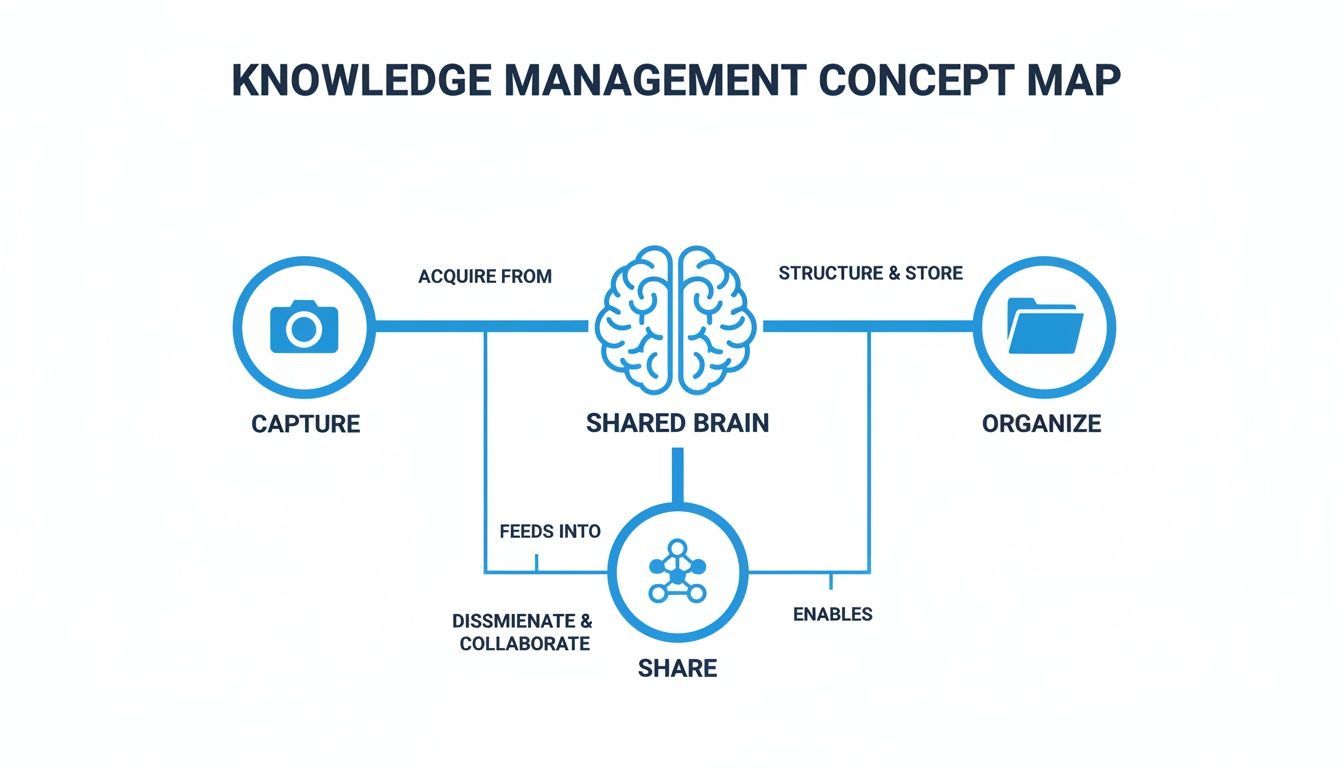
It’s a good reminder that a successful KMS isn’t a dusty digital archive. It’s an active system where information is constantly flowing in, getting structured, and then put to work to help people make better decisions.
1. Knowledge Capture
First things first, you have to get the information into the system. Knowledge capture is all about pulling insights from every corner of your business. This includes the easy stuff, or explicit knowledge, like reports, presentations, and process docs.
But the real gold is in the tacit knowledge—the insights and ideas locked up in conversations, brainstorming sessions, and team meetings. For years, this has been the hardest stuff to pin down. An idea sparks in a meeting, and if no one writes it down perfectly, it’s gone forever.
This is where modern tools are changing the game. Take a tool like Notize AI, for example. It completely automates the capture process for professionals, students, and creators. You just record a meeting, and it instantly generates a structured summary, detailed notes with speaker attribution, and a list of action items. Suddenly, spoken words become a searchable, permanent asset. No more good ideas lost to the ether.
2. Knowledge Organization
Once you’ve captured all this knowledge, you need to put it somewhere it can be found again. The knowledge organization pillar is what keeps your KMS from turning into a digital junk drawer. Without a logical system, even the most valuable information is useless because no one can find it.
This part is pretty straightforward and involves:
Creating logical folder structures: Grouping files by project, team, or topic just makes sense.
Using tags and metadata: Adding keywords to documents lets people find them through all sorts of different search queries.
Establishing clear naming conventions: Consistency is key. When everyone knows what to call a file, the whole system works better.
A well-organized KMS means people can find what they need without getting frustrated and giving up. In Notize AI, you can organize all your captured media—from meeting recordings to YouTube video summaries and even uploaded PDFs—into neat, customizable folders right from the start, building order from the ground up.
3. Knowledge Retrieval
Here's where the magic really happens. The whole point of a KMS is to get the right information to the right person at the right time. The knowledge retrieval pillar is all about making that happen instantly. The days of manually digging through endless folders are over.
Modern systems use AI-powered search that feels more like a conversation. You can ask a direct question and get a precise answer. For a student or professional using Notize AI, that means asking something like, "What was the final decision on the Q3 marketing budget?" and being taken to the exact moment in the meeting recording where it was discussed. With Notize AI, search goes from being a chore to a powerful discovery tool.
A great KMS doesn't just store information; it serves answers. The goal is to reduce the time spent searching from hours to seconds.
4. Knowledge Governance
Knowledge gets old. It evolves, becomes outdated, and needs a little TLC. The knowledge governance pillar is about setting up the rules of the road to keep your information accurate, relevant, and secure.
This means setting permissions for who can see or edit certain documents, having a clear process for archiving old information, and scheduling regular content reviews. Strong governance ensures the knowledge your team relies on is trustworthy and current, which helps you avoid costly mistakes based on bad data.
5. Knowledge Analytics
Finally, the knowledge analytics pillar helps you see how your team is actually using the information. By tracking key metrics, you can learn which documents are the most popular, what terms people are searching for, and—most importantly—where your knowledge gaps are.
These insights are pure gold. For example, if dozens of people are searching for a topic that has no documentation, that’s a massive sign telling you what content to create next. For creators using Notize AI, analytics can show how an audience interacts with their published blog posts, helping them fine-tune their content strategy and boost engagement. This data-driven loop is what ensures your KMS keeps getting better and smarter over time.
Unlocking Real-World Business Value
Let's be clear: a knowledge management system is much more than a fancy, well-organized digital filing cabinet. Think of it as an engine for real business growth. The magic isn't in just storing information; it’s in how that information helps your teams work smarter, faster, and more creatively. When you get it right, a KMS directly impacts your bottom line by turning scattered data into a strategic advantage.
The most immediate benefit? A massive boost in team efficiency. Research shows that employees can spend up to 20% of their workday just hunting for the information they need to do their jobs. That’s an entire day out of the week, for every single person, lost to a digital scavenger hunt.
A KMS slashes that wasted time. By creating a single, reliable source of truth, it puts the right answers at your team's fingertips, freeing them up to focus on the work that actually matters.
Driving Smarter Decisions with Complete Data
Great decisions are built on great information. But when critical data is stuck in different departmental silos or trapped in formats nobody can search, leaders are often forced to make calls with only half the story. This guesswork can lead to missed opportunities, costly mistakes, and strategies that are out of sync.
A KMS is the ultimate silo-buster. It gives decision-makers a complete, contextualized view of projects, customer feedback, and market trends. This becomes incredibly powerful when you bring in tools that capture information automatically.
For example, a product team could use Notize AI to automatically record, transcribe, and summarize dozens of user interview videos. Suddenly, all those key pain points, feature requests, and direct quotes are extracted, tagged, and organized in the KMS. What was once a pile of video files is now a rich, searchable database of customer intelligence, creating a direct line between user needs and product development.
Fostering a Culture of Innovation
Innovation isn't a lightning strike; it happens when ideas connect and build on each other. A KMS creates the fertile ground for this to happen by making the entire organization's collective wisdom accessible to everyone. An engineer can suddenly find insights from a past marketing campaign, or a salesperson can pull up technical specs from the product team without a dozen emails.
This kind of open access stops teams from constantly reinventing the wheel and encourages them to apply proven solutions to new challenges.
A well-implemented KMS creates a ripple effect. When one person solves a problem and documents the solution, that knowledge becomes a reusable asset for the entire organization, compounding its value over time.
Think about a marketing team planning a new campaign. Instead of starting from a blank page, they can dive into their KMS. Using Notize AI, they can instantly search the transcripts of every past kickoff meeting to find key decisions, budget talks, and strategic insights from previous launches. This helps them sidestep past mistakes and build on what worked, getting them to a successful launch much faster.
From Individual Knowledge to Organizational Power
Ultimately, a KMS transforms individual expertise into a durable, collective asset. This shift creates powerful benefits that ripple across the entire business.
Faster Onboarding: New hires get up to speed in record time by accessing a centralized library of processes, training materials, and project histories.
Improved Customer Support: Support agents find answers faster, resolving customer issues with confidence by drawing from a comprehensive knowledge base.
Enhanced Collaboration: Silos crumble when teams work from a shared pool of information, leading to better alignment and more effective teamwork.
Tools that automate knowledge capture are what make this a practical reality. By using an AI meeting note taker like Notize AI, for instance, you ensure the valuable discussions happening every day aren’t lost. Those fleeting conversations become permanent, searchable knowledge that helps everyone do their job better.
How Different Teams Put a KMS to Work
A knowledge management system isn't some rigid, one-size-fits-all database; its real magic comes alive when different teams bend it to solve their unique, everyday problems. Think of it as a central hub for company intelligence, but the way each team uses it is completely different. From closing deals to launching features, a good KMS becomes the quiet engine behind smarter, more connected work.
The value isn't in just having the system—it's in how it’s woven into the daily grind. When done right, a KMS feels less like a corporate chore and more like a secret weapon for each department, wiping out their biggest bottlenecks.
This visual shows how a KMS acts as the bridge between departments, like product and content, creating a seamless flow of information that benefits everyone.

This kind of connection means insights from one team don’t just sit in a silo—they become fuel for another team's next big project.
Product Teams and the Voice of the Customer
For product teams, a KMS is the ultimate vault for the "voice of the customer." Their entire job hinges on building things people actually want, which means they're constantly swimming in feedback from all over the place.
Without a KMS, this feedback is pure chaos—a jumble of support tickets, user interview recordings, sales call notes, and beta tester forums. With a KMS, that mess transforms into a structured, searchable goldmine of ideas.
This is where a tool like Notize AI really shines. A product manager can upload hours of user interview videos, and the platform gets to work instantly:
Transcribes the full conversation with near-perfect accuracy.
Generates summaries that cut right to the chase, highlighting key pain points and feature requests.
Pulls out action items, like bugs that need fixing or ideas worth exploring.
All this newly structured data gets funneled right into the KMS, where it’s tagged and organized. So, when the team sits down to plan the next release, they can instantly find every single mention of "dashboard improvements" or "mobile usability" from every customer chat. Notize AI takes the guesswork out of product development and focuses the team on what truly matters.
Sales Teams Turning Conversations into Capital
A sales team's most valuable asset isn't their pitch deck; it's the intel they gather on every call. Each conversation is loaded with details about a prospect’s goals, budget hurdles, and buying triggers. The problem? That knowledge usually dies in a CRM note or, even worse, just stays in the salesperson's head.
When you integrate a KMS with a tool like Notize AI, you turn that fleeting knowledge into a company-wide advantage. A sales rep can record a client call, and Notize AI automatically delivers a sharp summary, key talking points, and a clean list of follow-up tasks.
This information then lives in the KMS, ready for anyone to access. The marketing team can skim through summaries to sharpen their ad copy, the product team can spot emerging market needs, and sales leaders can track common objections to better train their reps. It creates a powerful feedback loop where insights from the front lines shape a smarter business strategy. For more tips on this, check out our guide on how to organize meeting notes for maximum impact.
A KMS empowers sales teams to sell smarter. Instead of starting every conversation from scratch, they can draw on the collective wisdom of every customer interaction that has ever happened in the company.
Content Creators as Knowledge Multipliers
For content creators, bloggers, and marketing teams, a KMS is basically a content engine. Their job is to spin complex ideas and raw data into compelling articles, videos, and social posts. A KMS provides the fuel by putting all the raw material they need in one place.
The move toward flexible, accessible platforms is obvious in market trends. Cloud-based KMS deployments now hold about 62.7% of the market share, which shows how much businesses value scalable systems that can integrate with modern tools. You can learn more about these KMS market trends and see how they line up with business priorities.
This is where the content creation process gets a serious upgrade. A content creator can grab a one-hour webinar recording, drop it into Notize AI, and get back:
A full, accurate transcription.
A tight summary that highlights the main points.
A draft blog post written in a specific tone (like professional or conversational).
A handful of suggested social media snippets and pull quotes.
This output gets organized right in the KMS, ready for a final polish and distribution. A task that used to eat up hours—watching, transcribing, and summarizing—is now done in minutes. This frees up content teams to produce more, repurpose valuable knowledge into different formats, and keep their messaging sharp and consistent everywhere.
Building Your First Knowledge Management System
Ready to put all this theory into practice? The good news is that building your first knowledge management system doesn't have to be some monumental, month-long undertaking. The secret is to start small, aim to solve one very real, very annoying problem, and then build from there. Let’s walk through how to get it done.
1. Define Your Goals
Before you start looking at software or mapping out folder structures, you need to ask one simple question: What specific problem are we trying to solve? Without a clear purpose, a KMS is just a digital junk drawer. Your goal needs to be concrete and, ideally, measurable.
Is your team constantly wasting time digging for the same files? Are brilliant ideas from meetings vanishing into thin air? A great goal would sound something like, "Cut the time our sales team spends searching for client info by 30% in the next quarter." Starting with a clear finish line makes every other decision a whole lot easier.
2. Audit Your Current Knowledge
Next, you need to get a handle on where everything lives right now. Think of it as a treasure hunt. A quick audit will show you the current map of your company's information. Just ask your team a few questions:
When you have a question, where’s the first place you look?
What information is the absolute hardest to find?
Where do our most important documents, call recordings, and project notes currently sit?
This little exercise will quickly uncover your biggest headaches and highlight all the "knowledge islands" that need to be connected. You’ll probably find that critical information is scattered across Slack threads, email chains, personal Google Drives, and—worst of all—only exists in people's heads.
3. Choose the Right Tools
Now that you know your goals and have a map of your current chaos, it’s time to pick your tools. This doesn't mean you need to buy a massive, all-in-one enterprise platform on day one. A much smarter approach is to combine a central hub (like a company wiki or a shared drive) with tools that automate the most painful parts of the process.
This is where a tool like Notize AI can be a game-changer. It gives you a huge win right out of the gate by automating the capture of all that "tacit knowledge" that's so hard to pin down. Simply by recording meetings, client calls, or brainstorming sessions, you can instantly generate summaries, notes, and action items. This becomes the lifeblood of your new KMS.
Your KMS is only as good as the information inside it. By automating the capture process with a tool like Notize AI, you ensure a steady stream of high-quality, structured knowledge flows into your system from day one, without adding extra work for your team.
4. Design a Simple Structure
Whatever you do, don't over-engineer the structure. A simple, logical framework that people actually use is infinitely better than a complex, perfect one that nobody understands. Start with broad categories that make sense for your business—think organizing by department, project, or even by client.
The objective here is intuitive navigation. A brand new hire should be able to poke around and find what they need without a detailed instruction manual. For a deeper dive, check out these content management best practices to help you build a system that can grow with you.
5. Drive User Adoption
A KMS is completely pointless if nobody uses it. Getting your team on board requires a smart launch and a bit of ongoing encouragement.
Start with a Pilot Group: Roll the system out to a small, friendly team first. They’ll be your guinea pigs and give you priceless feedback before you go company-wide.
Provide Simple Training: Host a quick walkthrough. Don't focus on features; focus on the "what's in it for me"—less time searching, faster answers, fewer interruptions.
Lead by Example: When managers and team leads actively use the KMS to share information and answer questions, everyone else will get the message.
6. Measure What Matters
Finally, let’s bring it full circle back to the goals you set in step one. To prove your KMS is actually working, you need to measure its impact. Track a few key metrics that tie directly back to your original problem.
Search Success Rate: Are people actually finding what they're looking for?
Time Saved: Send out a quick survey asking your team to estimate how much time the KMS saves them each week.
Content Engagement: Which documents, meeting notes, or guides are getting the most views?
Keeping an eye on these numbers doesn't just show the ROI of your efforts; it gives you the exact insights you need to keep making your KMS better and better over time.
Common Questions About Knowledge Management Systems
As you dig into the world of knowledge management, a few questions tend to pop up again and again. Getting a handle on these is the key to understanding how these systems work in the real world and figuring out if one is right for your team. Let's tackle the big ones.
What Is the Difference Between a KMS and Cloud Storage?
This is probably the most common point of confusion, and it’s a good one. The easiest way to think about it is this: cloud storage like Google Drive or Dropbox is a digital filing cabinet. It’s fantastic for storing and organizing files.
A Knowledge Management System, however, is more like an interactive company library crossed with a collaboration hub.
A KMS goes way beyond just holding files. It’s built for actively using the information inside. It has powerful search that understands what you’re looking for, version control so you don't use old data, and tools that let your team work together right inside the system. It’s not just about storage; it's about helping people find, share, and apply knowledge to do their jobs better. While a tool like Notize AI can feed structured information into both, you really see it shine when its automated summaries and meeting notes populate a living, searchable KMS.
Can Small Businesses or Freelancers Benefit from a KMS?
Absolutely. Knowledge management isn't just a big-ticket item for massive corporations anymore. The core idea—capturing what you know so you can find it later—is valuable for anyone, and modern tools have made it incredibly affordable and easy to start.
A freelancer, for instance, could use a simple KMS to keep project details, client feedback, and a swipe file of their best work all in one place. For a small business, it’s a game-changer for onboarding new hires, documenting critical processes, and building a single source of truth about your customers.
This is where Notize AI makes things so accessible. A solo creator or a small team can automatically build a knowledge base from their meetings, videos, and even social media links without needing a complex, enterprise-level system right out of the gate.
How Does AI Actually Improve a Knowledge Management System?
Think of AI as the engine that turns a static KMS into an active, intelligent partner. Its main job is to automate all the tedious, manual work that used to make knowledge management such a headache.
For example, instead of one person being tasked with taking and distributing notes, Notize AI can automatically transcribe and summarize an entire meeting, highlighting decisions and action items. Just like that, you’ve captured valuable insights that would have otherwise vanished into thin air.
But it goes deeper. AI is what powers the new wave of intelligent search. With Notize AI, you can ask a natural question like, "What did we decide about the Q3 budget?" and get a direct answer, with a link to the exact moment in a video where it was discussed. AI can also:
Proactively suggest documents relevant to the project you're working on.
Spot knowledge gaps by analyzing what people are searching for but not finding.
Help with housekeeping by flagging content that looks outdated.
It makes the whole system smarter, more intuitive, and a lot more useful for the entire team.
Ready to stop letting valuable insights from your meetings and videos disappear? Notize AI automatically captures, summarizes, and organizes your team’s knowledge, turning scattered conversations into a powerful, searchable asset. See how it can become the foundation of your knowledge management strategy by visiting https://notize.ai to get started.
What Is a Knowledge Management System? A Practical Guide




