
So, you need to transcribe a Zoom meeting. You've got a few solid options: Zoom's own built-in tools are a good starting point, especially with a paid plan. But for serious accuracy and features that actually save you time—like summaries and action items—a dedicated AI platform is the way to go. A tool like Notize AI can turn your recordings into genuinely useful, searchable content.
Why Bother With an Accurate Zoom Transcript?
Let's be real: in the whirlwind of back-to-back virtual meetings, important stuff gets lost. Key decisions, critical feedback, and who-agreed-to-what all start to blur the second you click "End Meeting." Trying to scribble notes while actively participating is a recipe for disaster. You either miss a key point while you're writing or your notes are too vague to be useful later.
This is precisely why a good transcript isn't just a "nice-to-have." It's your single source of truth—a perfect, searchable record of the entire conversation. With an intelligent tool like Notize AI, that record becomes a powerful asset for your entire team.
It's More Than Just Notes—It's Your Team's Memory
Think of a transcript as more than just words on a page. It's an accessible knowledge base that keeps your entire team on the same page. No more relying on foggy memories or debating who said what. Anyone can jump in and instantly verify a client's request, a project deadline, or a specific technical detail.
This simple shift has a massive impact. A project manager can instantly find that one specific feature request without re-watching an hour-long call. A marketer can pull exact quotes for a new case study in seconds. The practical benefits are immediate:
Real Accountability: You have a clear record of who committed to what, and by when. No more ambiguity.
Better Accessibility: Transcripts are a game-changer for team members who are deaf, hard of hearing, or for whom English is a second language.
Deeper Insights: When you can analyze the text, you start to spot trends, common objections, or recurring customer feedback that you'd completely miss otherwise.
Finding the Right Tool for the Job
You have a few different paths you can take here, and the best one really depends on what you need. Zoom's native features are convenient for quick, basic transcripts, but you'll often find they struggle with accuracy, especially with accents or technical jargon.
For anything that demands precision, you'll want to look at a dedicated third-party service. These tools are built from the ground up for one thing: transcription.
But the most effective approach I've found involves an advanced AI platform. A tool like Notize AI does more than just convert speech to text. It actually makes sense of the conversation. Notize AI can automatically pull out structured summaries, identify the most important discussion points, and even generate a to-do list. This transforms a simple recording into a genuine productivity asset and builds a workflow where every meeting becomes a valuable, reusable resource.
Using Zoom's Built-In Transcription and Captioning
Let's start with the most obvious option: Zoom itself. If you're on a paid plan, you already have access to a basic transcription tool. It's a convenient, no-frills way to get a simple text record of your conversation without leaving the platform.
For anyone on a Business, Education, or Enterprise plan, Zoom lets you automatically transcribe meetings you record to the cloud. The process is hands-off. Once your call is over and the recording has processed, Zoom creates a transcript file that lives right alongside your video and audio.
Activating Zoom's Native Transcription
Getting this set up is pretty simple, as long as you're an account admin or have the right permissions.
You just need to log into the Zoom web portal, head over to Settings, and click the Recording tab. From there, find the Audio transcript option under Cloud recording and flick the toggle on. You can also choose to show the transcript in a side panel within the video playback, which is a nice touch.
Once you’ve done that, every meeting you record to the cloud will get transcribed. You'll find the text as a .vtt file in your recordings, which is just a simple text file with dialogue and timestamps. For a deeper dive into the recording process itself, our guide on how to record a Zoom meeting covers all the bases.
The Honest Limitations of Zoom's Tool
So, what's the catch? While convenient, Zoom's native transcription has some very real limitations. I've found its accuracy can be hit-or-miss, especially if you have speakers with strong accents, people talking over each other, or a lot of technical jargon. Plus, it's officially only supported for English.
This is where you have to decide what "good enough" means for you. If you're just transcribing a quick internal team sync, Zoom's tool will probably get the job done. But for a high-stakes client call, a detailed user interview, or anything you plan to repurpose as content, you're going to need something much more precise, like Notize AI.
To help you decide, here's a quick way to think about it:
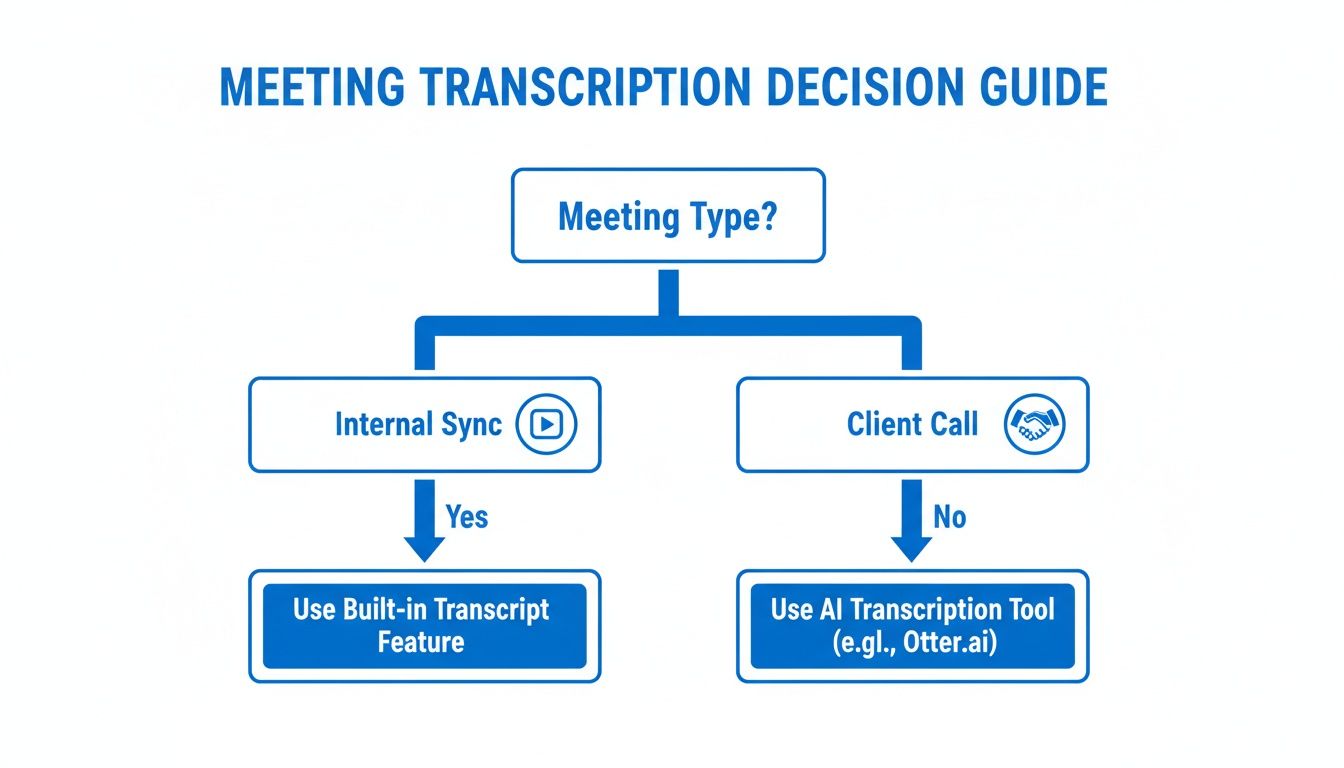
The flowchart drives home a simple but critical point: for everyday internal chats, Zoom's built-in transcription is often fine. For anything external or important, a dedicated AI tool is a much safer bet.
When Accuracy and Features Really Matter
The quality gap between Zoom's native tool and a dedicated AI platform is pretty wide. For a clearer picture, let's compare them side-by-side.
Zoom Native Transcription vs Third-Party AI Tools
Feature | Zoom Native Transcription | Third-Party AI Tools (e.g., Notize AI) |
|---|---|---|
Accuracy | Moderate; struggles with accents, jargon, and crosstalk. | High (90%+); trained on diverse datasets for superior precision. |
Speaker Identification | Basic, often unreliable or unavailable. | Advanced diarization to accurately label who said what. |
Language Support | English only (officially). | Extensive multi-language support (often 30+ languages). |
Actionable Outputs | Plain text file (.vtt). | Summaries, action items, chapter markers, key insights. |
Integration | Limited to the Zoom ecosystem. | Connects to CRMs, project management tools, and other apps. |
Search & Analysis | Basic text search within a single transcript. | Search across entire meeting libraries; identify trends and topics. |
Real-Time Transcription | Available as "Live Transcription" (captions). | Often more accurate and feature-rich real-time options. |
As the table shows, a dedicated tool isn't just about getting a more accurate transcript—it's about turning a conversation into something truly useful.
Many teams I work with have found a smart middle ground. They use Zoom's basic transcription for the 80% of their routine internal meetings. But for that critical 20%—the client kickoffs, board meetings, or crucial feedback sessions—they switch to a powerhouse tool like Notize AI.
With Notize AI, you can just upload your Zoom files and get back far more than a block of text. You get searchable meeting libraries, automated summaries, and genuine insights. It's built for professionals who need to turn conversations into action, not just archives. Relying only on Zoom's tool means leaving a ton of that value on the table.
Unlocking Precision with AI Transcription Platforms
While Zoom’s own transcription features are a decent starting point, there’s a clear line where "good enough" just doesn't cut it. For any meeting where the details genuinely matter—think client calls, user research sessions, or critical board discussions—you need a level of precision and functionality that basic tools simply can't deliver. This is where dedicated AI transcription platforms completely change the game.
These services go so far beyond just converting speech to text. They're engineered to understand the nuances of conversation, accurately tell speakers apart, and handle a wide variety of languages and accents. For anyone who needs to know exactly who said what, these platforms are indispensable.
Moving Beyond a Basic Text File
The real magic of a dedicated AI tool is its power to transform raw audio into structured, usable intelligence. Instead of just dumping a wall of text on you, a platform like Notize AI actually analyzes the conversation to give you something meaningful.
Picture a project manager wrapping up a huge client kickoff call. Instead of blocking off an hour to re-listen to the recording and manually peck out notes, they can just upload the file to Notize AI. In a matter of minutes, the system automatically kicks out:
A full, structured meeting summary that pulls out the most important topics.
A clean list of action items and to-dos, often with owners already assigned.
Highlighted decisions and follow-up tasks, ready to be sent out immediately.
A timeline of key moments you can click to jump right to that spot in the video.
This isn’t just a transcript; it’s a complete, intelligent record of the meeting. It saves your team hours of manual drudgery and makes sure nothing falls through the cracks. The focus shifts from just capturing words to actually extracting value.
Creating a Searchable Knowledge Base
One of the most powerful things a dedicated platform can do is build a centralized, searchable library of all your conversations. Just think about how much valuable information is currently locked away in your team's old Zoom recordings. With a tool like Notize AI, all that information becomes instantly accessible.
Instead of racking your brain to remember which meeting a specific decision was made in, you can just search across your entire meeting history. You can even ask the AI direct questions like, "What was the final decision on the Q3 budget?" and get an immediate answer, complete with a link to the exact moment in the video where it was discussed.
This transforms your meeting archive from a dusty digital folder into a dynamic, queryable knowledge base. It gives your team the power to find answers, verify details, and build on past discussions without ever having to sit through a full recording again.
This capability is especially crucial for teams managing complex projects or long-term client relationships, where that kind of institutional memory is the key to success.
Why Accuracy and Intelligence Matter
There's a reason the market for these advanced tools is exploding. The AI meeting transcription market is projected to surge from $3.86 billion in 2025 to a staggering $29.45 billion by 2034, all driven by the needs of remote and hybrid teams.
With nearly 60% of remote workers admitting they struggle to retain information from virtual meetings, platforms like Notize AI are becoming essential. They help organizations cut down overall meeting time by as much as 25% by getting rid of the need for repetitive recaps and manual note-taking. For knowledge workers who spend over 23 hours a week in meetings, this hands back more than five hours of productive time each week. You can learn more about the growth of automated transcription on Sonix.ai.
Practical Use Cases Across Teams
The benefits ripple out far beyond simple note-taking and make a real impact in all sorts of professional roles. Notize AI is designed to help creators, professionals, and students save time and turn media into actionable output.
For Journalists and Content Creators: A journalist doing an interview over Zoom can upload the recording to Notize AI and get a highly accurate transcript almost instantly. From there, the platform can help draft a polished blog post in a specific tone—professional, conversational, or friendly—making the whole content creation process significantly faster. They can even build and publish to a blog directly within the app.
For Students and Professionals: A student can record a long lecture and use Notize AI to get not just a transcript, but a tight summary, key study points, and simplified explanations of complex topics. The ability to ask the AI questions about the lecture and jump to the exact moment a topic was explained is an incredibly powerful study aid.
For Teams and Professionals in Meetings: For team leads and other professionals, the value is obvious. Notize AI lets you start recording directly from the app during a meeting. Once it's over, the platform delivers a comprehensive report with everything neatly attributed to the right speaker, ensuring perfect clarity on who committed to what. You can then organize these reports into team folders and share them in a click, keeping everyone on the same page.
Ultimately, choosing a dedicated AI platform like Notize AI for your Zoom meetings is an investment in your team's efficiency and intelligence. It’s the difference between having a simple text file and having a smart assistant that helps you understand, organize, and act on every single conversation.
Best Practices for Crystal-Clear Transcriptions
You’ve heard the old saying "garbage in, garbage out," and it's never been more true than with meeting transcriptions. Even the most sophisticated software will churn out a messy, inaccurate transcript if you feed it poor-quality audio. Getting the best results starts with capturing the cleanest audio possible.
Think of it this way: your audio is the raw material. A few simple tweaks before and during your meeting can make a world of difference in the final output, whether you're using Zoom's built-in tools or a dedicated service like Notize AI.
Optimizing Your Audio Environment
More often than not, a chaotic recording environment is the main culprit behind a jumbled transcript. Things like office chatter, a humming AC unit, or the dog barking in the next room can easily confuse transcription algorithms, resulting in garbled sentences and flat-out wrong words.
Your first move should always be to find a quiet space. An enclosed room with soft surfaces—think carpets, curtains, or even just a lot of furniture—is perfect because it helps deaden echoes and absorb ambient sound. This one change can boost transcription accuracy more than you’d think.
Key Takeaway: Your microphone is the single most important factor for clear audio. Ditching your laptop's built-in mic for a dedicated USB microphone or a quality headset is a small investment with a huge payoff in transcription accuracy.
Improving your setup doesn't have to be complicated. Here are a few practical tips I always follow:
Mind Your Mic Placement: A good rule of thumb is to keep your microphone about 6-12 inches from your mouth. Get too close, and you'll get those annoying "popping" sounds. Too far, and your voice will sound thin and distant.
Run a Pre-Meeting Audio Check: Before everyone joins, jump into Zoom’s audio settings and use the "Test Speaker & Microphone" feature. It’s a quick way to make sure your levels are good and that you’ve selected the right mic.
Encourage Good Meeting Etiquette: It's completely fine to politely ask participants to mute themselves when they aren't speaking. This is a game-changer for preventing their background noise from bleeding into the recording and muddying the active speaker's audio.
If you’re still wrestling with persistent background noise, we have some more advanced techniques in our guide on how to reduce background noise on your mic.
Guiding the Conversation for Clarity
Beyond the tech, the way your meeting actually flows has a massive impact on your transcript's quality. AI tools are smart, but they get tripped up when people talk over each other. This "crosstalk" is one of the biggest reasons for transcription errors.
Try to encourage participants to speak one at a time. A good moderator can really help here, guiding the conversation and making sure everyone gets a chance to speak without overlapping. A simple reminder for everyone to speak clearly and at a moderate pace also goes a long way. Mumbling or rushing through sentences makes it tough for any transcription service to keep up.
This is especially crucial for tools like Notize AI that can identify who said what. When speakers are clearly separated, the AI can accurately label each segment, which is essential for creating reliable meeting notes and assigning action items later on.
The Final Polish Post-Transcription
Let's be realistic: even with perfect audio, no automated transcript is ever 100% flawless. It’s always smart to give the text file a quick review after the meeting wraps up.
When you're proofreading, focus on a few key areas:
Proper Nouns and Jargon: AI often stumbles on unique names, company-specific acronyms, or niche industry terms. A quick find-and-replace pass makes your document look far more professional.
Speaker Labels: If your tool identifies speakers, just double-check that the labels are right, especially during those moments when a few people spoke in quick succession.
Ambiguous Phrases: If you read a sentence that just doesn't make sense, listen back to that part of the recording. The AI probably misinterpreted one word that changes the entire meaning.
This final review turns a decent transcript into a great one. Platforms like Notize AI really simplify this step by presenting an editable transcript right alongside a timeline of important moments. This lets you jump directly to a specific point in the recording to verify any details. Taking those extra five minutes ensures your final record is polished, accurate, and ready to share.
Turning Transcripts into Actionable Assets with Notize AI
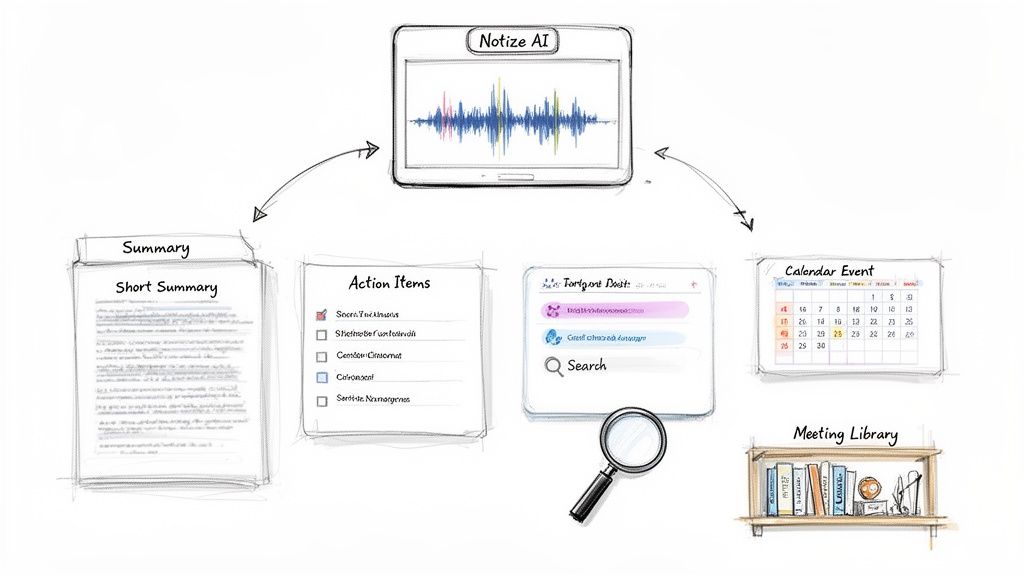
Getting a high-quality transcript is a great first step, but let's be honest—a wall of text isn't all that useful on its own. The real magic happens when you turn that static transcript into something dynamic. Knowing how to transcribe a Zoom meeting is only half the job. The other half is pulling out the summaries, action items, and key insights that actually save time and help you make decisions.
This is exactly where a tool like Notize AI comes in. It goes way beyond basic speech-to-text. Think of it as an intelligent assistant that actually understands the context of your conversations, processing your recordings to deliver organized, genuinely useful outputs for different roles.
For Teams and Professionals in Meetings
Picture this: your marketing team just finished a feedback session with a key client. The call was gold—packed with opinions, feature requests, and pain points. In the past, someone would be stuck spending hours re-listening to the recording and manually typing up notes.
Instead, they can just upload the recording to Notize AI.
A few minutes later, the platform delivers:
A concise, structured summary of the main discussion points.
Detailed meeting notes with speaker-attributed segments.
Action items and follow-ups, already assigned to the right team members.
Highlighted decisions and a timeline of important moments for quick review.
This kind of automation means nothing gets missed. More importantly, it lets your team act on that valuable feedback right away. With Notize AI, every meeting becomes part of a searchable library, so anyone can go back and find exactly what was said about a project or decision.
For Journalists, Bloggers, and Creators
If you're a content creator, you know the drill. The creative process often kicks off with an interview, but manually transcribing it is a total drag. It’s a bottleneck that kills creativity and slows down your entire publishing schedule.
This is another spot where smart processing makes a world of difference. A creator can upload a Zoom interview to Notize AI and get a polished, speaker-labeled transcript almost instantly. But that's just the beginning. The platform can then generate a draft blog post based on the conversation, tailored to a specific tone—whether you need it to sound professional, friendly, or casual.
By automating the heavy lifting of transcription and first drafts, creators can jump straight to refining the story and adding their own unique voice. It radically speeds up the whole process from idea to published article.
For those looking for a complete workflow, Notize AI even lets you build a blog right inside the app, complete with analytics to see how your audience is engaging. It's a seamless path from transcription to content creation to publishing.
For Students and Educators
The academic world is all about absorbing massive amounts of information from lectures and study groups. For students, the fear of missing one critical point while scribbling notes is real. Recording a lecture is helpful, but who has time to re-watch a two-hour session to find a single concept?
Here, Notize AI becomes the ultimate study partner. A student can upload a recorded lecture and get back:
Organized Study Notes: The entire lecture, neatly broken down into summaries and key takeaways.
Targeted Q&A: You can ask the AI specific questions about the material—like "What did the professor say about cellular mitosis?"—and get an instant answer, complete with a link to the exact moment it was discussed.
Simplified Explanations: For really complex topics, the AI can rephrase concepts to make them easier to grasp.
This transforms a passive recording into an active, interactive learning tool. It helps students review material more efficiently, clarify doubts on the spot, and prep for exams without the grind. Every recording becomes a valuable, easy-to-search academic asset.
Common Questions About Transcribing Zoom Meetings
When you start digging into how to transcribe your Zoom meetings, a few questions always pop up. Let's get right to them and give you the clear answers you need, based on real-world experience.
Can I Really Transcribe a Zoom Meeting for Free?
This is probably the most common question, and the answer is a solid "yes, but with a catch." Zoom's own transcription feature is a nice perk, but it's locked behind their paid plans (Pro, Business, or Enterprise) and only works on cloud recordings. If you’re using the free version of Zoom, you're out of luck with their native tool.
But don't worry, you have other options. Many excellent third-party tools, including Notize AI, have free plans or generous trial periods. These usually give you a certain number of transcription minutes each month, which is perfect for transcribing your most critical meetings without paying a dime or upgrading your Zoom account. It's a fantastic way to see how well a dedicated service works before you decide to invest.
How Long Does It Actually Take to Get a Transcript?
The time it takes to get a finished transcript can range from a few minutes to a full day, depending entirely on the method you choose.
Doing it Yourself: If you decide to go the manual route, be prepared for a serious time commitment. The industry standard is that it takes 4-6 hours of focused work to accurately transcribe just one hour of audio.
Using AI: This is where things get exciting. A powerful AI platform like Notize AI can turn an hour-long Zoom recording into a full transcript, complete with a summary and action items, in just a handful of minutes. Seriously, it's often done before your coffee is ready.
The speed of AI is a game-changer. For anyone whose time is valuable, automating transcription means you get to spend more time on high-impact work instead of getting bogged down in administrative chores.
Which Method is the Most Accurate?
Accuracy is non-negotiable. While Zoom's built-in transcription is handy, its performance can be a bit hit-or-miss. It often struggles with background noise, people talking over each other, or specialized industry terms.
If you need a transcript you can trust, a dedicated AI service is your best bet. Platforms like Notize AI are built from the ground up for this, using sophisticated speech-recognition technology to reach accuracy rates of 90% or higher. They're much better at telling different speakers apart and understanding a wide range of accents, which means you get a much cleaner transcript that needs very little cleanup.
What About the Security and Privacy of My Recordings?
It’s completely understandable to be cautious about uploading your meeting recordings to an online service. Any reputable platform will treat your data's security as its top priority. When you're evaluating a tool, look for clear commitments to security, like end-to-end encryption and compliance with privacy regulations like GDPR.
At Notize AI, we put your data's security first. Every file is processed and stored with strict privacy controls to ensure your conversations stay confidential. Before you upload anything sensitive, it’s always a good idea to quickly review a platform’s privacy policy to make sure it meets your company's standards. A little due diligence goes a long way in giving you peace of mind.
Ready to turn your Zoom meetings from temporary conversations into lasting, searchable assets? With Notize AI, you can get accurate transcripts, automated summaries, and clear action items in minutes. Stop taking notes and start focusing on the conversation. Try Notize AI for free and see the difference.
How to Transcribe Zoom Meetings: A Practical Guide




