At its core, converting audio to text is simply the act of turning spoken words from a recording into a written document. Thanks to modern AI, this process is now incredibly fast, affordable, and surprisingly accurate, giving you a powerful way to make your content more accessible, searchable, and reusable.
Why Converting Audio to Text Is No Longer Optional
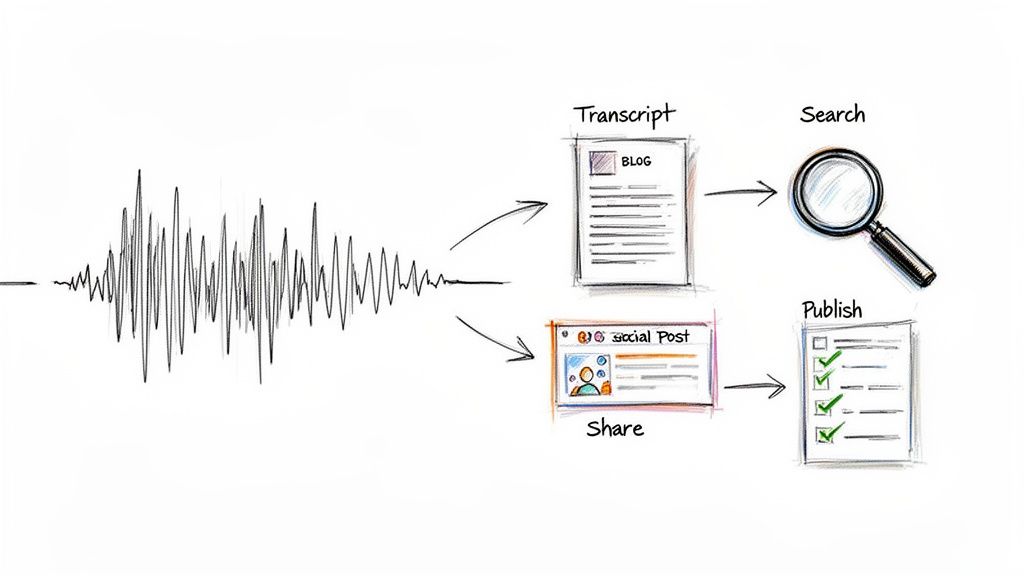
We're drowning in audio and video content—podcasts, webinars, virtual meetings, you name it. But if that content only ever exists in its original format, you're leaving a massive amount of value on the table. It’s like locking your best ideas in a vault nobody can open.
Being able to convert audio to text isn't just a nice-to-have anymore; it’s a strategic move for anyone trying to maximize their impact. The people who are really winning at this aren't just transcribing—they're transforming their entire workflow. They're using text to make their content more discoverable, accessible, and versatile. It's the classic "work smarter, not harder" in action.
Unlocking Content Potential for Creators
Think about it from a content creator's perspective. You've just recorded a killer hour-long interview. Without a transcript, that's one piece of content. But once you run it through a tool like Notize AI, that single recording can fuel a dozen different assets.
With a good transcript, Notize AI helps creators, journalists, and bloggers automatically generate:
An SEO-friendly blog post built from the conversation in any writing style.
Dozens of shareable quotes and snippets for social media.
A full, accurate transcript for accessibility and search engine visibility.
AI suggestions to improve wording, hooks, and storytelling.
The ability to publish directly to a blog built within the Notize AI app.
This is exactly how smart creators are repurposing their work. They take one core audio file and spin it into a multi-channel content strategy, reaching a much wider audience with minimal extra effort. It’s not just about saving a few hours; it’s about making every single thing you create work harder for you.
Streamlining Collaboration for Teams
Now, let's switch gears to a professional team. You just wrapped up a critical weekly sync-up where ideas were flying, decisions were made, and tasks were assigned. But who caught all of it? Let’s be honest, manual note-taking is distracting and almost always incomplete.
This is where a tool like Notize AI becomes a game-changer for day-to-day operations. Simply record the meeting, and you instantly have a searchable, permanent record of the entire discussion.
I've seen chaotic meeting recordings turned into an organized, searchable database. A platform like Notize AI can automatically produce a full meeting summary, pinpoint key discussion topics with timestamps, and generate a clear list of action items with speaker attribution. Nothing falls through the cracks.
With a searchable log, anyone on the team can find the exact moment a key decision was made without having to scrub through a 60-minute video. This simple step drives alignment, boosts accountability, and gives everyone a clear path forward. Using Notize AI just cuts through the ambiguity and keeps projects on track.
How to Prepare Your Audio for Flawless Transcription
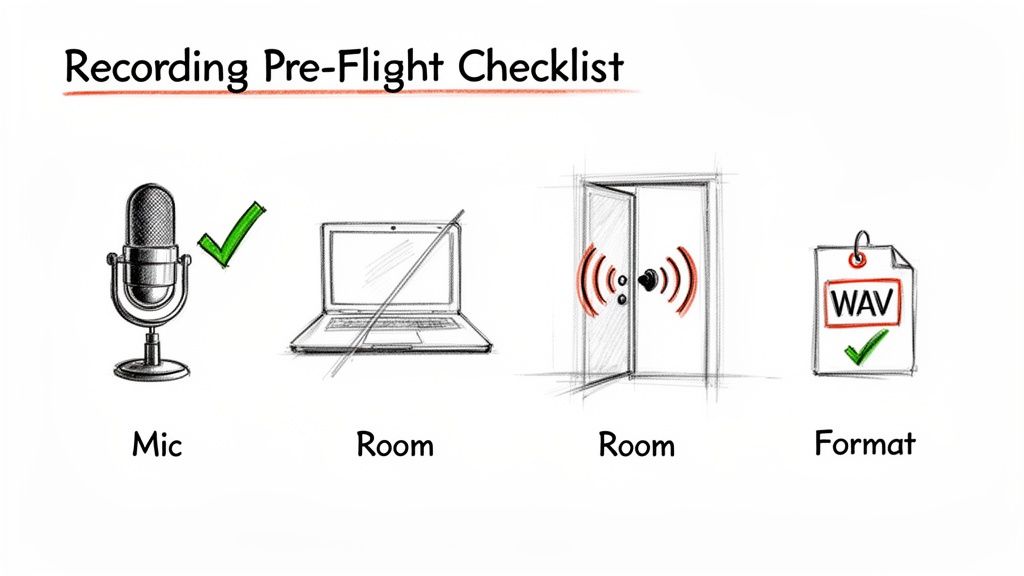
Here's a secret I've learned after years of dealing with transcripts: the magic isn't just in the AI. It's in the audio you feed it. Before you even start to convert audio to text, spending just a few minutes prepping your recording can save you hours of frustrating edits down the line.
Think of it this way: even the most powerful platforms like Notize AI can only work with what they're given. Giving them clean, clear audio is the single best thing you can do to guarantee an accurate transcript right from the start.
Nail Your Recording Environment
That built-in microphone on your laptop? It's convenient, but it’s an open invitation for every distracting sound in the room—keyboard clicks, your computer’s fan, the echo bouncing off the walls. For a massive leap in quality, grab a simple external microphone. Even an affordable USB mic will do a much better job of isolating your voice and capturing clear audio.
Where you record matters just as much. Forget the big, empty office. A smaller room with soft surfaces is your best friend. Think carpets, curtains, bookshelves, or even a walk-in closet packed with clothes. These materials absorb sound waves, killing the echo that can muddy your words and trip up transcription software.
Key Takeaway: The goal is simple: eliminate any sound that isn't the voice you want to transcribe. A quiet room and a decent mic can single-handedly boost transcription accuracy by 10-15%. That's your biggest lever for quality control, right there.
If you’re stuck with some unavoidable background hum, don't sweat it too much. Modern tools like Notize AI have powerful noise reduction features built in. Still, a clean source file will always yield the best results. For a deeper dive, check out our guide on how to reduce background noise on a mic.
Choose the Right Audio File Format
Not all audio files are created equal, and for transcription, this really matters. Whenever you have the choice, go with a lossless format. These file types keep all the original audio data intact, giving the AI the richest, most detailed sound to work with.
Here’s a quick look at common audio formats and which ones give AI the best material to work with.
Comparing Audio Formats for Transcription Accuracy
File Format | Best For | Key Consideration |
|---|---|---|
WAV | Highest quality transcription and professional archiving | Files are very large but offer uncompressed, crystal-clear audio. |
FLAC | High-quality archival with smaller file sizes | Lossless compression means no quality is lost, just a smaller file. |
MP3 | General use, sharing, and web uploads | A compressed format that can sacrifice subtle audio details. |
When it's time to convert audio to text, uploading a WAV or FLAC file to a tool like Notize AI provides the most information for the AI to analyze, leading to a better outcome.
That said, if all you have is an MP3, don't let it stop you. Today’s technology is more than capable of handling compressed files. The main takeaway is simply to start with the highest-quality source you have available.
Choosing Your Transcription Path: Human vs. AI
When it's time to turn audio into text, you've got a big decision to make: do you go with a human transcriber or an AI-powered tool? This isn't just about technology; it's a choice that directly impacts your timeline, budget, and how you work.
For a long time, human transcription was the only way to get a truly accurate transcript. A person can pick up on tricky accents, untangle a conversation where everyone's talking at once, and understand niche terminology. But that level of detail has always come with a steep price tag, both in money and, more importantly, in time. It’s a slow, methodical process that can take hours or even days for a single audio file.
The AI Advantage: Moving at the Speed of Business
This is where AI transcription tools have completely flipped the script. Platforms like Notize AI can turn around a transcript in minutes, not days. This isn't just a minor convenience—it unlocks the ability to work at a scale that was impossible just a few years ago.
Let’s imagine a real-world scenario. A marketing team just finished 20 customer interviews and needs to pull out key feedback before their weekly sprint meeting.
The Old Way (Manual): This would be a logistical nightmare. It would take days, cost a small fortune, and the team would almost certainly miss their deadline for turning those insights into action.
The Smart Way (AI): Using Notize AI, they can upload all 20 files at once. In just a few hours, they have everything they need: full transcripts, AI-generated summaries, key discussion points, and even a list of actionable next steps.
This kind of speed turns transcription from a slow, archival task into a dynamic tool that informs decisions in near real-time.
The AI transcription market is exploding for a reason. Valued at USD 10.02 billion in 2023, it's projected to nearly triple to USD 30.01 billion by 2031. This isn't just hype; it's a direct response to the massive amount of audio and video content being created every day, where speed is everything.
A New Look at Accuracy and Cost
The old knock against AI was that it just wasn't accurate enough. That’s simply not true anymore. With decent audio quality, modern AI transcription engines consistently deliver accuracy rates that are on par with, and sometimes better than, human transcribers.
Tools like Notize AI are trained to handle a wide range of accents and technical jargon, and they do it for a tiny fraction of what manual services charge.
For the vast majority of business needs—whether you're documenting meetings, creating subtitles, or repurposing podcast content—AI hits the sweet spot. It's fast, affordable, and delivers the accuracy you need to get the job done. You can see a full breakdown in our guide to automated transcription services.
Sure, for a complex legal deposition with terrible audio, a human expert might still have a slight edge. But for almost everything else, AI is the obvious choice.
A Real-World Workflow: Converting Audio with Notize AI
Seeing is believing, so let's walk through what a modern, AI-powered transcription workflow actually looks like in practice. It’s surprisingly straightforward and designed to get you from a raw audio file to a polished, usable transcript in minutes.
With a tool like Notize AI, getting your audio into the system is the first simple step. You have a few options: upload an audio or video file straight from your computer, drop in a link from YouTube or TikTok, or even record something new right inside the app.
Once you’ve uploaded your file, the AI takes over. It immediately starts transcribing, but it’s doing more than just converting speech to words. It’s also figuring out who is speaking and when (speaker diarization) and adding precise timestamps to each line. The result is a clean, organized transcript that’s actually easy to read and reference.
From Transcript to Actionable Intelligence
A raw transcript is useful, but it's often just a wall of text. The real value comes from what you can do with it after the words are on the page. This is where AI tools really shine.
For instance, Notize AI doesn't just hand you the transcript. It instantly generates an AI summary, giving you the key points of the entire conversation at a glance. Think about how useful that is for catching up on a meeting you couldn't attend.
It also automatically pulls out a list of action items and to-dos mentioned during the conversation. For anyone managing projects or teams, this is a lifesaver—no more missed deadlines or forgotten tasks because someone forgot to write them down.
Here’s a perfect example: a student records a two-hour lecture and uploads it to Notize AI. Instead of scrubbing through the entire recording to study a specific topic, they can just ask the AI chat, "What were the three main arguments against the proposed theory?" Notize AI will deliver a concise answer and even point to the exact moments in the video where the professor discussed them.
Unlocking Deeper Insights with AI Chat
This ability to "talk" to your transcript is a huge leap forward. The AI chat feature in Notize AI basically turns your audio and video files into an interactive database you can query.
You can ask it anything about the content, like:
"What was the final decision made about the Q3 budget?"
"Give me the key takeaways from our client feedback call."
"Draft a blog post based on the main themes discussed in this podcast episode."
This completely changes the game. You're no longer just passively transcribing; you're actively analyzing, repurposing, and extracting value from your audio content.
The comparison below really drives home the advantages of an AI workflow over sending files out for manual transcription.
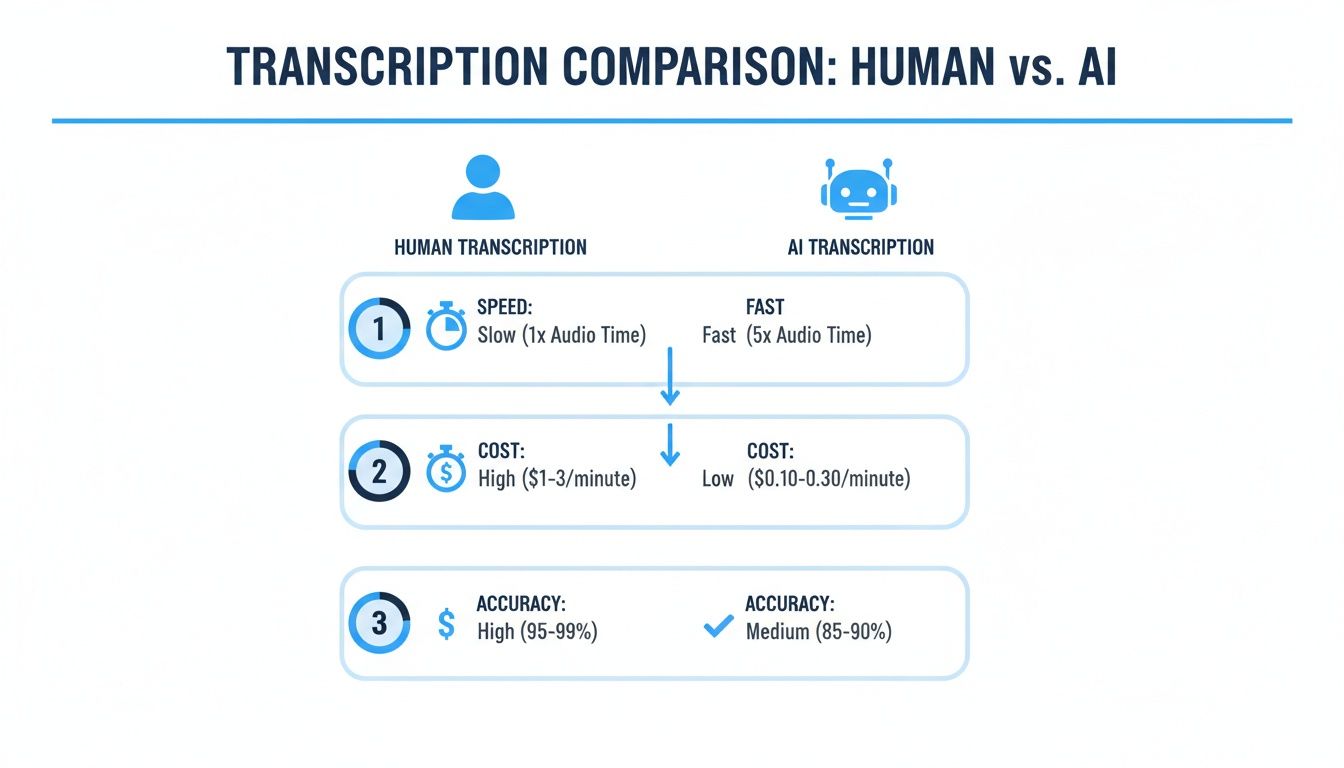
As you can see, AI-powered tools like Notize AI hit the sweet spot of speed and cost-effectiveness, delivering accuracy that is more than sufficient for the vast majority of business, academic, and creative needs. The efficiency boost is undeniable.
Turn Your Transcript into Valuable Content
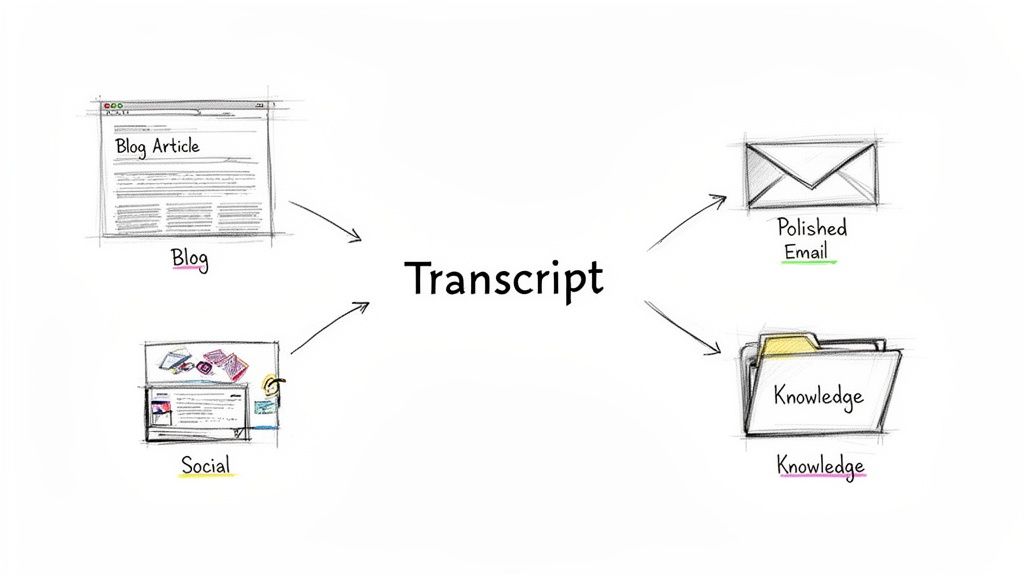
Getting a transcript is just the start. The real magic isn't in the raw text itself, but in what you build from it. The ability to convert audio to text unlocks a process that creates genuinely useful assets for your business or brand.
This is where you need to change your thinking. A transcript isn't just a record of a conversation. It's the raw material for a whole library of content and a massive productivity boost.
For Creators: From Podcast to Polished Blog Post
If you're a podcaster or video creator, you know that an interview transcript is a content goldmine. But let's be honest, manually wrestling that raw text into a compelling blog post is a soul-crushing task that takes hours. This is where a smart tool like Notize AI changes the game.
You can feed it your interview, and it does more than just transcribe. It helps you generate a complete, well-structured blog post almost instantly. The platform can even nail the specific writing style you're going for, whether that's ultra-professional, friendly and casual, or a custom tone that's unique to you.
Generate an Article: Instantly create a working draft from your transcript.
Customize the Tone: Choose from a variety of writing styles to match your brand's voice.
Publish Directly: You can even build your blog inside the app and publish your new post.
This kind of workflow turns one piece of audio into a powerful, SEO-rich article that’s ready to go. For a deeper dive, check out our guide on powerful content repurposing strategies.
For Professionals: From Meeting to Momentum
In the business world, it’s all about clarity and action. After a team meeting, nobody wants to dig through pages of a transcript to figure out what was actually decided. This is precisely why AI-driven summaries and action items are becoming so essential.
A platform like Notize AI can take a meeting recording and transform it into a structured summary with key discussion points, highlighted decisions, and a clean list of to-dos. It stops being a transcript and becomes a blueprint for what happens next.
Think about drafting that follow-up email in seconds. With Notize AI, you just copy the AI-generated summary and action items, paste them into your email, and hit send, confident that everyone is on the same page. It cuts through the noise and keeps projects moving without anyone having to be the designated notetaker.
This shift isn't just a hunch; the demand is exploding. The speech-to-text API market shot up from USD 2.2 billion in 2021 and is projected to hit USD 5.4 billion by 2026. This massive growth, as detailed by MarketsandMarkets, shows just how critical the need is to convert audio to text effectively across all industries. By using a tool like Notize AI, you're tapping into this powerful trend to build an intelligent, searchable knowledge base that makes everyone more productive.
Pro Tips for Accuracy, Automation, and Privacy
Once you've gotten the hang of the basics, you can start using a few advanced strategies to really get the most out of converting audio to text. It’s about more than just a simple transcription; it's about building an efficient, secure, and almost effortless system.
Let’s be honest, one of the biggest headaches is dealing with industry-specific jargon or those unique acronyms every company has. Standard AI models often trip over these, leaving you with a messy transcript to clean up. This is where a tool like Notize AI really shines, because it lets you build a custom vocabulary. By feeding it your specific terms ahead of time, you teach the AI your language, which dramatically boosts accuracy for technical content.
Securing Your Confidential Conversations
In this day and age, data privacy is everything. When you’re transcribing sensitive client calls, strategic meetings, or private interviews, you have to be completely sure that information is locked down.
Before you upload anything confidential, do your homework and check the security policies of the transcription service you’re using. You should be looking for platforms that offer serious, end-to-end encryption. Notize AI, for example, is built with this in mind, making sure your data is secure both while it's being uploaded and while it's stored. That's the only way to get real peace of mind.
This demand for security and precision is a huge part of the market's growth. North America is currently leading the charge, holding over 35.2% of the global AI transcription market in 2024, which translates to a whopping USD 1.58 billion in revenue. This is largely because industries like business, healthcare, and law were early adopters—fields where accurate and secure transcripts are absolutely critical. You can dig deeper into the AI transcription market trends at Market.us.
Creating a Hands-Off Transcription Workflow
The real game-changer for productivity? Automation. Manually uploading every single audio file is a tedious chore that you can, and should, eliminate entirely. The goal is to set up a seamless system where your audio is transcribed automatically, without you having to lift a finger.
This is where integrations are your best friend. With Notize AI, you can connect your most-used tools to create a truly automated workflow.
Zoom Integration: Ever finish a call and forget to transcribe it? Link your accounts to have all your Zoom cloud recordings sent straight to Notize AI for transcription and analysis automatically.
Google Drive Sync: You can set up a specific folder in Google Drive where any new audio file you drop in gets processed right away.
API Connections: For the more tech-savvy, you can use API connections to build custom solutions that plug transcription directly into your company’s internal software.
Setting up these kinds of connections means every important conversation gets captured and turned into searchable text without any extra work from you. For a team, it creates an always-up-to-date knowledge base. For a content creator, it’s an automated pipeline. This is what it really means to master converting audio to text.
Got Questions About Transcription? We’ve Got Answers.
When you first start looking into turning audio into text, a few questions always pop up. I’ve heard them all over the years. Here are some straightforward answers to the most common ones, so you know exactly what to expect from today's transcription tools.
Just How Accurate Is AI Transcription?
This is the big one, isn't it? The final accuracy really hinges on how clean your audio is, but I've seen top-tier platforms like Notize AI consistently hit over 90% accuracy with clear recordings.
But honestly, the raw word-for-word accuracy isn't even the whole story anymore. The real magic is what happens after the text is generated. These tools can now pull out summaries, key insights, and even a list of action items automatically. So with something like Notize AI, you’re not just getting a wall of text; you're getting a clear, usable understanding of the conversation.
Can I Get a Transcript From a Video File?
Absolutely. This is standard practice now. Modern transcription tools are built for all kinds of media, not just simple audio files.
With a platform like Notize AI, you’ve got a couple of easy ways to do this:
You can upload video files like MP4 or MOV straight from your computer.
Or, just paste a link from places like YouTube, Facebook, Instagram, or TikTok.
The software just strips the audio out, transcribes it, and gets it ready for you. It's a game-changer for anyone who wants to quickly summarize a long lecture or repurpose video content into a blog post without the manual grind.
Here's a real-world example: I've seen people feed a one-hour YouTube tutorial into Notize AI and walk away with a concise summary, ask the AI specific questions about the content, and even generate a step-by-step guide from the video—all without ever touching the timeline.
Is It Actually Safe to Upload Confidential Meetings?
Security is everything, especially when you’re talking about sensitive business strategy or client calls. You absolutely must choose a service that takes data protection seriously.
Look for platforms built with strong security from the ground up. Notize AI, for example, uses robust encryption to make sure your confidential discussions stay private from the moment you upload them. Your data should be protected every step of the way.
How Does It Handle Multiple Speakers?
This is where the AI really shines. The best tools use a clever process called speaker diarization.
Think of it this way: the AI listens to the conversation, identifies the unique voice prints of each person, and then automatically labels who is speaking and when. The result is a clean, easy-to-follow script where every line is tagged with the correct person and a timestamp. For anyone trying to document team meetings with Notize AI, or for interviews and panel discussions, this feature is a lifesaver. You’ll never have to wonder "who said what?" again.
Ready to turn your audio and video files into something you can actually use? With Notize AI, you can get accurate transcripts, smart summaries, and clear action items in just a few minutes. Stop scribbling notes and start making an impact. Try Notize AI for free and see how it works.
A Modern Guide to Convert Audio to Text




