Taking truly great meeting notes isn't about becoming a human stenographer. It’s about making a crucial mental shift from passively recording conversations to actively capturing what matters: decisions, action items, and key questions. The real secret is to focus on the outcome, ensuring every note you jot down has a clear purpose and drives tangible progress long after the meeting has wrapped.
Why Most Meeting Notes Fail and How to Fix It
Let's be honest, most meeting notes end up in a digital graveyard. They become a jumbled mess of half-formed thoughts, random comments, and vague points that are never looked at again. This happens because many of us fall into the trap of trying to capture everything that’s said, acting more like a court reporter than a strategic participant. That whole approach misses the point of the meeting entirely.
The goal isn't to create a perfect transcript; it's to build a blueprint for what comes next. Ineffective notes are a direct path to team misalignment and stalled projects. This isn't a small problem—it’s a massive drain on resources. With an estimated 56 million meetings happening daily in the US, poor note-taking contributes to a staggering $37 billion annually in costs from unproductive sessions. And when 77% of workers say they attend meetings that just lead to another meeting, it’s obvious that lost decisions and forgotten action items are a huge issue.
This is where a change in mindset makes all the difference. Instead of thinking, "What did everyone say?" you need to start asking, "What did we decide?" and "Who is doing what by when?" This simple shift transforms your notes from a passive record of the past into an active tool for driving accountability. To take this a step further, check out our guide on setting effective norms for meetings to get your whole team aligned.
Transforming Your Note-Taking Habits
The fix is to adopt a modern, outcome-first approach. It means leaving behind the old habits that just create noise and embracing strategies that deliver clarity. This is precisely what tools like Notize AI are designed for. They handle the heavy lifting of transcription and summarization, freeing you up to focus on participating and guiding the conversation. Instead of being stuck as the scribe, you can be the facilitator, while Notize AI flawlessly captures the details in the background. With Notize AI, professionals can record meetings directly in the app and get a full, structured summary with key insights, action items, and a searchable transcript.
The real value of meeting notes isn't in what they record, but in what they enable. Great notes don't just document the past; they define the future by making sure every decision leads to a concrete action.
Most of us have picked up some bad habits over the years. The table below shows how to trade those ineffective methods for powerful, actionable solutions that actually work.
Transforming Your Notes From Ineffective to Actionable
Ineffective Note-Taking Habit | Effective Note-Taking Solution |
|---|---|
Trying to write down every word spoken. | Focusing only on capturing key decisions, action items, and critical questions. |
Creating a chronological, narrative-style document. | Using a structured template with dedicated sections for outcomes, owners, and deadlines. |
Taking notes in isolation for personal use. | Collaborating on a single, shared document that serves as the official source of truth. |
Manually transcribing and summarizing after the meeting. | Using an AI tool like Notize AI to automatically generate transcripts, summaries, and action lists. |
By consciously choosing the solutions on the right, you'll immediately see your notes become more focused, collaborative, and, most importantly, useful.
Setting the Stage Before the Meeting Begins
Great meeting notes don’t just happen. If you walk into a meeting cold, expecting to capture every brilliant idea as it flies by, you’re setting yourself up for failure. That reactive approach is exactly why most notes end up as a jumbled mess of half-thoughts.
The real secret to taking better notes is to build the framework before anyone even joins the call. This simple shift in mindset changes your role from a frantic scribe to a strategic participant who guides the outcome.
Define a Clear Objective and Agenda
First things first: every single meeting needs a purpose. Without one, it's just a conversation that probably should have been an email.
Start by writing a single, powerful sentence that answers the question: "By the end of this meeting, we will have..." This could be anything from "decided on the Q3 marketing budget" to "finalized the user feedback implementation plan." Having this North Star is non-negotiable.
Once your objective is locked in, build an agenda that directly supports it. Think of each agenda item as a stepping stone to get you to that final goal. A truly effective agenda isn't just a list; it’s a plan.
Make sure it includes:
Key discussion points: The actual topics you need to cover.
Time allocation: A realistic timeframe for each topic to keep things moving.
Topic owner: The person responsible for leading each part of the discussion.
This structure does more than just keep the meeting focused—it hands you a pre-built template for your notes. You already know what to listen for, which makes capturing the important stuff so much easier.
Leverage Past Insights with Notize AI
Here’s where top performers separate themselves: they learn from the past. Instead of digging through old emails or trying to recall a conversation from weeks ago, they use a tool like Notize AI to get up to speed in minutes.
Imagine you have a follow-up call with a client. Before you hop on, you can open your Notize AI library and instantly pull up AI-generated summaries from all your previous meetings with them. Notize AI allows you to search across all past meetings using keywords, ensuring you never lose track of important information.
In seconds, you're reminded of:
Key decisions that were already made.
Action items that are still outstanding.
Important questions that came up but were never fully answered.
This quick pre-meeting ritual ensures you walk in completely informed, ready to build on what you've already accomplished. With Notize AI, you’re not starting from scratch; you’re picking up a coherent, well-documented conversation right where you left off.
This modern approach transforms cluttered raw input into clear, actionable intelligence.
The flow here shows how a tool like Notize AI acts as the essential bridge, turning the chaos of a live discussion into the organized clarity you need to actually move projects forward.
When you prep with Notize AI, you stop wasting time rehashing old ground. You can focus the meeting—and your note-taking—on what's new and what's next. It’s the difference between walking in prepared and walking in blind.
With a clear agenda and the full context fresh in your mind, your ability to capture high-quality notes improves dramatically before the meeting even starts.
Mastering Note Capture During the Meeting
Alright, the meeting has started. This is where most people hit the panic button. The natural instinct is to try and become a human stenographer, typing every single word someone says. We've all been there, frantically trying to keep up, but it's a losing battle.
This approach is not only exhausting, but it’s completely counterproductive. When your brain is bogged down in transcription duty, you lose the ability to think critically, ask smart questions, or even process what's being said. You're just a typist, not a participant.
The real key to great in-meeting notes is to stop transcribing and start listening for what actually matters. You need a simple framework to filter out the noise. This is how you shift from being a passive scribe to an active, strategic voice in the room.
The Actions, Decisions, and Questions Framework
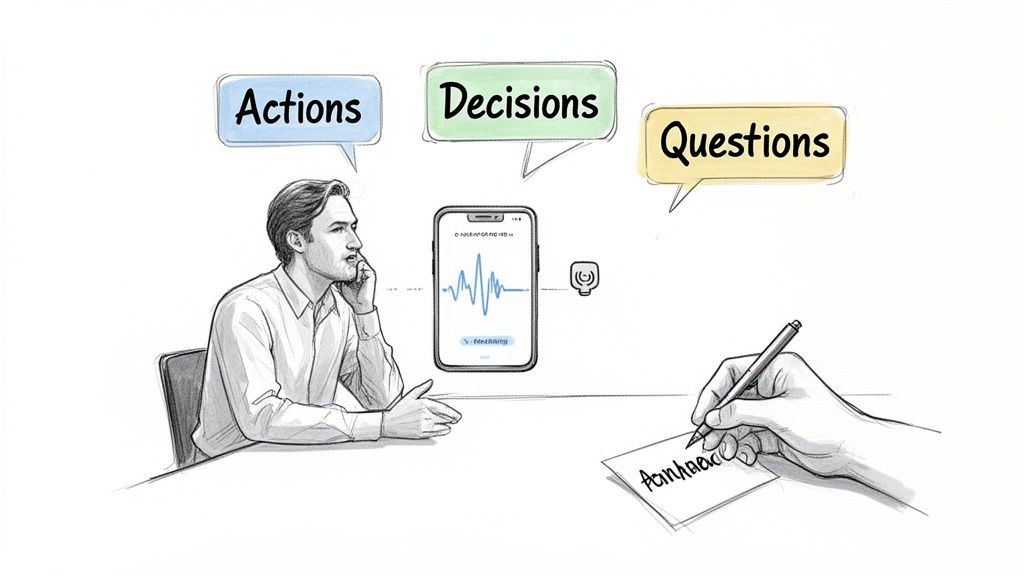
From now on, I want you to train your ears to listen for just three things: Actions, Decisions, and Questions (ADQ). It's a surprisingly simple filter that cuts right through the conversational fluff.
Actions: What specific tasks need to be done? Listen for who owns it and when it's due. You'll hear phrases like "we need to," "the next step is," or "can you handle that?"
Decisions: What did we actually agree on? Capture the final verdict on any topic, no matter how long the debate was. This is the "so what?" of every agenda item.
Questions: What important questions came up that we couldn't answer right away? Jotting these down ensures they don't get lost in the shuffle and can be tackled later.
When you focus on ADQ, your notes instantly become a concise record of outcomes, not a long, rambling transcript. You're capturing the commitments and resolutions that actually push work forward.
The Automation Advantage with Notize AI
The ADQ framework is a huge improvement, but let's be honest—it still takes a lot of mental energy to pull off while you're also trying to contribute to the conversation. This is the fundamental problem with manual note-taking: you're always multitasking.
This constant juggling act is a massive drain on focus. In fact, 73% of professionals admit to multitasking during meetings, and it's a big reason why 71% lose time every week to follow-up meetings just to clarify things that weren't captured correctly the first time. You can see more on how multitasking hurts meeting productivity to understand the scale of the problem.
This is precisely where an intelligent tool like Notize AI completely changes the game. You no longer have to choose between participating and documenting. You can finally do both.
With Notize AI, your role fundamentally changes. You are no longer the frantic note-taker trying to keep up. You are the present, engaged professional who can focus entirely on the conversation, confident that every single detail is being captured flawlessly in the background.
When a meeting starts, you just hit record in the app. That's it. From that moment on, the heavy lifting is handled for you. While you’re listening, asking insightful questions, and guiding the discussion, Notize AI is working quietly behind the scenes.
It does things that are simply impossible for a human to do in real-time:
Creates a highly accurate transcript of the entire conversation.
Identifies who said what by distinguishing between different speakers.
Flags key moments and important discussion points as they happen.
Generates a full, structured meeting summary the second the meeting ends.
This automated process means you never have to worry about missing a critical decision or action item again. If there's ever a debate about what was really said, Notize AI lets you jump directly to that moment in the recording to get the exact context. No more ambiguity, no more crossed wires.
Using Notize AI isn’t just about taking better notes; it’s about redefining your role in a meeting. It frees you from the administrative chore of being a scribe and empowers you to be a leader, a problem-solver, and a strategic thinker—the very reasons you were invited in the first place. You can finally shift your focus from capturing the past to shaping the future.
Turning Raw Notes Into Actionable Intelligence
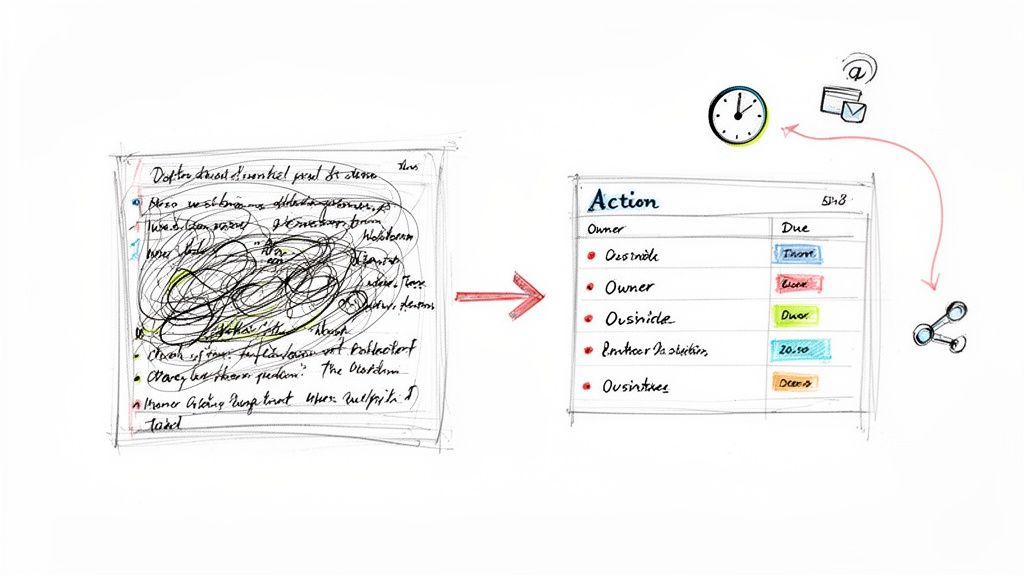
A page full of scribbled notes is just raw material. The real magic happens after the meeting, when you transform that chaotic information into a clear plan. This is the crucial moment where talk turns into tasks and ideas get real.
If you don't have a solid post-meeting routine, even the best notes can end up in a digital graveyard, forgotten and useless. The trick is to act fast, while the conversation is still fresh in your mind. This avoids the fuzzy details that kill projects and force you into endless follow-up meetings.
The First 15 Minutes: Review and Refine
Those first 15 minutes after a meeting are gold. Don't waste them. Your only goal here is to clean up your notes so anyone can understand what happened, even if they weren't there.
This usually involves a few quick clean-up tasks:
Fix the formatting: Add headings, use bullet points, and bold key terms to make the document easy to scan.
Translate your shorthand: What did "ProjX upd. Q3?" really mean? Spell it out.
Fill in the blanks: Jot down any important context you were holding in your head but didn't have time to write down.
Let's be honest, though—this manual cleanup is a drag. It’s often why notes get sent out late, or never at all. Having to mentally replay the entire meeting is a huge productivity killer, especially when your calendar is packed with back-to-back calls.
The Notize AI Advantage: Instant Clarity
This is where a tool like Notize AI completely changes the game. Instead of wrestling with your notes, a perfectly structured report lands in your inbox the second the meeting ends. The whole "review and refine" process is basically done for you.
With Notize AI, you’re not just getting a raw transcript. You’re getting a professional, polished summary that includes:
A crisp, AI-generated overview of the meeting.
Bulleted lists of key discussion points and insights.
Detailed, speaker-tagged notes if you need to dive into the specifics.
This lets you skip straight from the meeting to the most important part: figuring out what to do next.
Pulling Out Action Items and Assigning Owners
This is where the rubber meets the road. Great meeting notes must answer one simple question: "So, what happens now?" Without clear action items, a meeting is just a chat.
An action item isn't just a task; it's a promise. To make it stick, it needs two things:
An Owner: One person who is on the hook for getting it done.
A Deadline: A specific date to create a sense of urgency.
When you assign an owner, you create accountability. A task with no owner is a task that's going nowhere. For a more detailed look, check out our guide on building a solid meeting action items template that your team can use again and again.
The difference between a good meeting and a great one often comes down to the quality of its action items. Vague tasks lead to vague results. Specific, assigned actions with clear deadlines drive real progress.
Trying to catch all these commitments in a fast-moving conversation is tough. It's so easy to miss who agreed to what. Notize AI solves this by automatically flagging potential action items, follow-ups, and key decisions.
The platform hands you a pre-populated to-do list, so all you have to do is confirm the owner, set a deadline, and share the report. What used to be a tedious post-meeting chore now takes just a couple of minutes. Even better, you can click on any action item in Notize AI and jump to the exact moment it was discussed in the recording. No more confusion or debates about what was actually said.
Ultimately, this changes your entire workflow. You can get a polished, accurate, and actionable summary out to your team in minutes, keeping the momentum from the meeting flowing directly into productive work.
Choosing Your Note Taking Method and Tools
How you take notes can make or break the value you get out of a meeting. The tools you choose—whether it’s a simple pen and paper or a sophisticated AI platform—directly shape your ability to capture what’s important, stay organized, and actually act on the information later.
Of course, classic techniques like the Cornell Method provide a solid framework. They force you to think structurally. But even the best manual methods depend on you keeping up with a fast-paced conversation, which isn't always realistic. You can learn more about these foundational techniques by exploring the different types of note taking methods, but today’s professional toolkit has come a long way.
From Manual Scribe to Meeting Intelligence
The conversation has shifted. It’s less about which manual method is superior and more about how technology can give you an edge. The real goal is to stop being a stenographer and start being a strategic contributor. That requires a tool that handles the grunt work of documentation for you.
This is where a platform like Notize AI really changes the game. It’s not just another app for typing things down; it’s a full-fledged meeting intelligence system built to automate the whole process. While you stay present and engaged in the conversation, Notize AI is in the background recording, transcribing, and structuring everything so nothing important slips through the cracks.
Think about a student recording a lecture. Manually, they might miss key concepts while trying to write everything down. With Notize AI, they can focus on understanding the material, knowing the app is creating a perfect transcript and summary they can ask questions about later.
This kind of automation is more than just a convenience. A staggering 61% of C-suite leaders point to unclear objectives as a major productivity killer. And when you learn that only 37% of meetings actually use an agenda, it’s easy to see why outcomes are so often muddy. On the flip side, teams that use structured note-taking systems see a huge improvement, with 79% reporting clearer outcomes from their meetings. Notize AI also shines for content creators, who can upload audio or video to generate high-quality blog posts and transcriptions, saving hours of manual work.
Note-Taking Methods Manual vs AI-Powered
So, what are the practical differences between the old way and the new way? The table below breaks down how traditional note-taking stacks up against modern AI solutions like Notize AI, highlighting the key advantages that can make a real difference in your day-to-day workflow.
Feature | Manual Note-Taking | Basic Digital Notes | Notize AI Platform |
|---|---|---|---|
Transcription | Entirely manual and prone to errors. | Manual typing; impossible to capture everything. | Automated, highly accurate transcription with speaker labels. |
Summaries | Requires significant post-meeting effort to create. | Needs manual review and summarization. | Instantly generated AI summaries, key points, and insights. |
Action Items | Relies on your ability to spot and record them accurately. | Manually flagged; easy to miss in a fast discussion. | Automatically detected and listed for easy assignment. |
Searchability | Not searchable; information is locked on the page. | Basic text search within a single document. | Powerful keyword search across all past meetings. |
Review & Follow-Up | Time-consuming review process. | Requires rereading the entire document. | Jump directly to the exact moment a topic was discussed in the recording. |
Sharing | Requires scanning or retyping notes to share. | Easy to share the file, but lacks structure. | Instantly share polished, structured reports with colleagues. |
The gap between manual methods and an intelligent platform is pretty clear. With Notize AI, you’re not just taking notes—you're creating a permanent, searchable record of every conversation.
This ends the "who said what?" debates for good. You have a single source of truth that clarifies every decision and commitment, completely backed by the original recording. Notize AI turns your notes from a static document into a dynamic asset that drives accountability and keeps your entire team on the same page.
Got Questions About Meeting Notes? We've Got Answers
Even with a great system in place, shifting how you handle meeting notes can bring up a few questions. Let's tackle some of the most common ones I hear from teams making the switch.
How Can I Take Good Notes Without Being the Dedicated Scribe?
This is the classic meeting dilemma, isn't it? You need to participate and offer your expertise, but you're stuck with your head down, furiously typing. The secret is to stop trying to be a court reporter.
Your goal isn't to transcribe every word. It's to capture outcomes. Think less about what's being said and more about what's being decided. Focus on jotting down key decisions, clear action items, and any lingering questions. That mental shift alone will make a world of difference.
Of course, the real game-changer is letting technology handle the transcription entirely. Tools like Notize AI can join your meeting and do the heavy lifting for you. It records the conversation, creates a summary, and pulls out the action items while you stay focused on the discussion. You get to be fully present without missing a single detail.
What's the Best Format for Sharing Meeting Notes?
The best format is one people will actually read: clear, concise, and scannable. Nobody wants to wade through a novel-length email to find out what they need to do.
A simple, effective structure usually looks like this:
A quick summary at the very top. Just a sentence or two on the meeting's purpose and key results.
Bulleted lists for important decisions and discussion points.
A clean table for action items, with columns for the task, who owns it, and when it's due.
This is where a platform like Notize AI really shines. It automatically generates a structured report that’s already organized for clarity. You can share it knowing everyone can quickly grasp what happened and what they need to do next, saving you a ton of formatting time.
How Soon After a Meeting Should I Send the Notes?
Send them out quickly. I aim for within a few hours, but definitely no later than 24 hours after the meeting wraps.
Momentum is everything. When the conversation is still fresh, people are much more likely to review their action items and flag any points that need clarification. Waiting a day or two sends an unintentional message that the meeting wasn't all that important, and things start to fall through the cracks.
This is a huge benefit of using an AI assistant. Instead of blocking off an hour on your calendar to clean up your scribbles, Notize AI has the summary and detailed notes ready almost immediately. You can give it a quick once-over and hit "send" before you even grab your next cup of coffee.
Can AI Really Capture the Nuances of a Complex Discussion?
This is a fair question. Modern AI is incredibly good at capturing the factual content of a conversation—the what was said. It can pick up on complex industry terms, identify different speakers, and produce a near-perfect transcript you can search later. In that sense, a tool like Notize AI gives you an objective source of truth.
What it won't capture is the subtext—the subtle shift in tone, the body language, or the "vibe" in the room. But that's where you come in.
Think of it as a partnership. The AI handles the rote work of documentation, freeing you up to focus on the uniquely human parts of the job: reading the room, guiding the conversation, and making sure everyone is truly aligned. Notize AI takes care of the "what" so you can focus on the "why."
Ready to stop scribbling and start leading? Notize AI transforms your meetings by automatically creating summaries, action items, and searchable transcripts, so you can focus on what truly matters. Discover how Notize AI can revolutionize your workflow today.
How to Take Better Meeting Notes: Quick, Actionable Tips




