
To truly summarize a meeting well, you need to do more than just take notes. The real goal is to capture the essential decisions, assign crystal-clear action items, and get a concise follow-up into everyone’s hands within 24 hours. Forget a word-for-word transcript; you're creating a focused brief that gets everyone on the same page about what was decided and what happens next.
Why Most Meeting Follow-Ups Fail
We've all been there. You leave a meeting feeling energized, full of great ideas, only to watch that momentum fizzle out by the next morning. What went wrong? Almost every time, the culprit is a failure to properly summarize the discussion and create a shared record of what actually mattered.
Without that clear summary, all that valuable time and energy is lost. This isn't just a small administrative slip-up—it's a massive drain on productivity and morale. When follow-ups fall flat, teams get stuck with misaligned priorities, people accidentally redo work, and there's a constant, nagging uncertainty about who's supposed to do what. Progress stalls while everyone waits for clarity that never comes.
The Hidden Costs of Poor Summaries
The sheer scale of this problem is eye-opening. In the United States alone, a staggering 36 to 56 million meetings take place every single day. The ineffective ones bleed an estimated $37 billion from the economy each year. Think about it: executives often spend up to 23 hours a week in meetings. When those conversations don't lead to clear follow-ups, the ripple effect of wasted time and money is enormous. You can dig into more data on meeting statistics to see just how deep this issue runs.
This is precisely why learning to summarize a meeting effectively is no longer a soft skill—it's a critical business advantage.
A great summary isn't just a document; it's a tool for momentum. It provides clarity on decisions, assigns accountability for next steps, and ensures the entire team is aligned, whether they were in the room or not.
Bridging the Gap with Automation
Here’s the catch: creating a good summary by hand is a pain. Trying to actively participate in a discussion while furiously scribbling notes is a recipe for missing something important. This is exactly where intelligent tools like Notize AI are making a huge difference.
Instead of anointing one person as the dedicated "scribe" (who then can't fully engage), you can lean on technology. A platform like Notize AI completely changes the dynamic. You just hit record and focus on the conversation.
Once the meeting is over, Notize AI does the heavy lifting, automatically generating a structured summary, detailed notes with speaker-attributed segments, a clean list of action items, and highlighted decisions. It can even pinpoint key topics and figure out who said what. This kind of automation turns hours of talk into clear, actionable insights in minutes.
Comparing Manual Notes to AI Summarization
Let's break down the real-world difference. Here's a quick look at how traditional note-taking stacks up against using an intelligent tool like Notize AI for capturing meeting outcomes.
Metric | Manual Summarization | Automated with Notize AI |
|---|---|---|
Time Spent | 30-60+ minutes post-meeting | 5-10 minutes for review |
Accuracy | Prone to human error and bias | Highly accurate, verbatim capture |
Completeness | Often misses nuances or key details | Captures everything, including context |
Objectivity | Filtered through the note-taker's lens | Unbiased, direct from the source |
Participant Focus | Divides attention between listening & writing | Allows 100% focus on the conversation |
Turnaround | Slow; often delayed by a day or more | Instant; ready immediately after the meeting |
Ultimately, a tool like Notize AI doesn't just make you faster; it allows your team to reclaim its focus and ensure every single discussion drives real, tangible progress.
Set the Stage for a Perfect Summary Before You Hit Join
Here’s a secret that separates the pros from the amateurs: a great meeting summary doesn't start when the meeting ends. It starts before you even click "Join."
If you walk into a meeting without a plan, the conversation will likely wander. Trying to pull a clear, actionable summary out of that mess afterward is a nightmare. The quality of your summary is a direct reflection of the meeting’s structure.
Your most powerful tool here is a solid agenda. An agenda is more than just a list of topics; it’s your roadmap. It forces you to define the meeting's purpose. Are we here to make a final decision? Brainstorm new ideas? Or just get a status update?
Knowing the objective helps focus the discussion and gives any summarization tool, including Notize AI, the context it needs to figure out what actually matters. Think of the agenda as the skeleton you'll build your summary around later.
Prepare Your Tools for Flawless Capture
With your agenda set, it's time to make sure your tech is ready to capture everything flawlessly. Let’s be honest, you can't be fully present in a discussion if you’re frantically trying to scribble notes.
This is where a tool like Notize AI really shines. Your only job is to start recording directly in the app when the meeting starts. From there, it handles the heavy lifting—transcribing the conversation and automatically generating a structured summary complete with action items and follow-up tasks. You get to focus on the conversation, not the note-taking.
If you're not using an automated system, you've got a bit more prep work to do:
Check Your Audio: A muffled recording means a garbage transcript, which leads to a useless summary. Test your mic beforehand and ask key speakers to do the same.
Get Consent: This is non-negotiable. Always let everyone know you're recording. It’s about transparency and, in many places, legal compliance. We cover this in our guide to establishing effective norms for meetings.
Position Your Mic: For in-person meetings, place the microphone in the center of the table so it can pick up every speaker clearly.
A few minutes of prep work makes all the difference. By creating a structured environment, you ensure the information you capture is relevant, clear, and ready to be turned into a summary that actually drives action.
How to Capture What Really Matters During the Call
Let's be honest: your real value in a meeting is your brain, not your typing speed. The old-school approach of frantically trying to type everything said means you're always a step behind the conversation. It forces you into a no-win situation—either you participate fully, or you take detailed notes. You can't really do both well.
The smarter move? Offload the capturing part entirely. By using a tool like Notize AI to record the call, you free yourself up to actually think, ask good questions, and steer the conversation. You get to shift from being the meeting scribe to being an active, strategic participant. That’s where you make a real impact.
Let a Tool Do the Heavy Lifting
Manual note-taking just doesn’t scale in today's world of back-to-back virtual calls. People are now in an average of 10.1 virtual sessions per week, and with 86% of meetings involving remote team members, the complexity is off the charts. Throw in the fact that nearly a third of these calls stretch across different time zones, and the idea of one person flawlessly capturing every key detail becomes almost laughable. You can get a deeper look at the state of modern meetings from recent statistics.
This is where letting a tool handle the recording and transcription becomes a game-changer. Something like Notize AI just sits in the background, recording and transcribing the entire conversation with impressive accuracy. It even figures out who’s talking and timestamps everything, creating a perfect, searchable record of the meeting without you having to lift a finger. For you, this means no more "wait, who agreed to that?" moments a week later. With Notize AI, you can even jump directly to the exact moment a specific topic was discussed.
The goal isn't to become a perfect human transcriber. It's to get a perfect record of the meeting so you can focus on the conversation itself. Automation is what makes this a reality.
If You Absolutely Have to Take Manual Notes
Okay, so sometimes automation isn't an option. If you find yourself having to take notes the old-fashioned way, the trick is to stop trying to write down every word. Instead, train yourself to listen for signals.
Your focus should be on active listening. Use a simple shorthand to flag the most critical information as it comes up. This lets you jot things down quickly without mentally checking out of the conversation. We have a whole guide on how to take meeting notes effectively that goes much deeper into these techniques.
But for a quick start, try this simple system:
(D) for Decisions: Mark any point where the group makes a final call.
(A) for Action Items: Flag any task assigned to someone.
(Q) for Questions: Note any open questions that need an answer later.
This simple method helps you scan your notes later and instantly pull out the decisions and action items, which are the building blocks of any useful summary. And whether you’re recording or taking notes by hand, clean audio is non-negotiable. It’s worth looking into practical steps to reduce background noise for crystal-clear recordings to make sure you capture everything accurately.
Transforming Raw Notes Into an Actionable Summary
The meeting's over. Now what? The real work often starts after everyone logs off—the tedious task of turning messy notes or a long recording into something that actually drives action. A great summary isn't a transcript. It's a strategic document, built to be so concise and clear that your team can't possibly ignore it.
I've found that a simple framework works best every time. Lead with the most important stuff: the decisions. This immediately gets anyone who missed the call up to speed on the outcomes. Next, list out the action items. Be ruthless here—every task needs an owner and a deadline. No exceptions. Finally, you can add a brief overview of the main discussion points for those who need a bit more context.
Moving From Manual Effort to Automated Clarity
Let's be honest, manually creating a solid summary can eat up anywhere from 30 minutes to an hour. You're re-reading your scribbles, trying to remember who agreed to what, and piecing the puzzle together. It's a classic productivity killer that delays follow-ups and stalls project momentum.
This is the old way versus the new way, visualized.
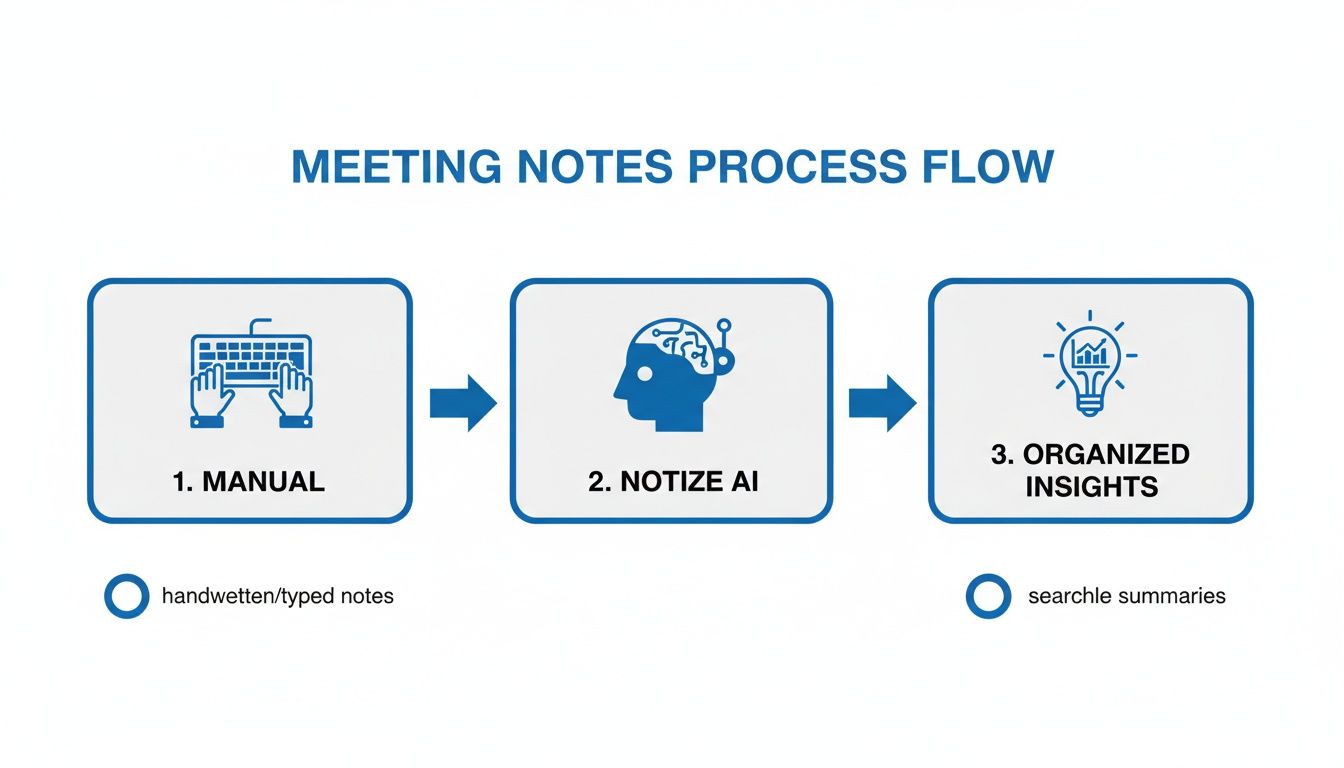
The flow is pretty clear: automation takes the grunt work of listening, typing, and organizing off your plate. It turns a raw recording into a structured, usable asset in just a few minutes.
The Notize AI Advantage
This is exactly where a tool like Notize AI changes the game. Instead of you spending your valuable time sifting through a recording, it processes the entire conversation and generates a perfectly structured summary almost instantly.
It hands you everything you need, no manual effort required:
A concise summary hitting the main points.
A clean to-do list with clearly defined action items and follow-up tasks.
Key discussion points and insights, tagged to the right speaker.
A full, searchable transcript if you ever need to dig deeper.
A timeline of important moments for quick review.
What used to be a dreaded post-meeting chore becomes a quick review. With Notize AI, a professional, actionable summary is ready to share with your team within minutes of the call ending.
A summary's value is directly tied to its speed and clarity. The faster you can deliver accurate takeaways and action items, the more likely your team is to act on them while the conversation is still fresh.
Structuring Your Summary for Impact
For those who are still doing it manually, structure is everything. Without a solid format, your summary will get skimmed and forgotten. To get better at distilling conversations, you might want to look into AI summarization tools that can help pinpoint key moments for you.
To illustrate, I’ve put together a quick guide on what a powerful summary looks like, piece by piece. Think of this as your go-to template.
Anatomy of a Powerful Meeting Summary
A clear, actionable template for structuring a professional meeting summary that gets results.
Component | Description | Example |
|---|---|---|
Meeting Details | Essential context. Include the date, time, meeting title, and a list of attendees. | Date: Oct 26, 2023 |
Key Decisions | The most critical part. Lead with the final outcomes and approved items. Use bold text. | Decision: The Q3 marketing budget is approved at $50,000, with funds allocated to the new social media campaign. |
Action Items | A clear to-do list. Each item must have a specific owner and a firm deadline. | Action: Alex will draft the project brief for the Q3 social campaign and share it by EOD Friday. |
Discussion Overview | A brief, high-level summary of the main topics discussed for anyone needing extra context. | Discussion: We reviewed Q2 performance metrics, which were up 15%. Brainstormed three potential concepts for the new campaign. |
This structure ensures that even the busiest team members can grasp the most important information in under a minute.
For a deeper dive into making your to-do lists truly effective, check out our complete guide on building the perfect meeting action items template. The difference between a vague task and a specific one is the difference between action and inaction.
Ultimately, whether you're using a smart tool like Notize AI or a battle-tested manual template, the goal is always the same: turn conversation into clear, forward-moving action.
Getting Your Summary to the Right People at the Right Time
You can craft the most brilliant, insightful meeting summary on the planet, but it’s completely worthless if it never gets seen. A perfect recap of decisions and action items does zero good buried in an inbox or lost in a folder nobody ever opens. The final, and arguably most critical, step is getting that summary into the right hands while the conversation is still fresh.
This is why speed is everything. You absolutely have to get your summary out within 24 hours of the meeting. If you wait any longer, you’ll lose all the momentum and focus your team just worked so hard to build. The whole point is to keep the ball rolling and kick off immediate action, not just create another document to be filed away.
Building a Centralized Knowledge Hub
Sending a summary over email is a start, but creating a central hub for all this information is where the real magic happens. When meeting notes are scattered across everyone's personal inboxes, you're just creating information silos. Good luck getting a new team member up to speed or finding a specific action item from a meeting a month ago.
This is precisely where a platform like Notize AI can completely change the game. Instead of a chaotic archive of random documents, it turns your entire meeting history into a valuable, searchable knowledge base. It automatically organizes all your meeting content—summaries, transcripts, and action items—into a clean, structured system, so anyone can find what they need in seconds. Distributing reports instantly with colleagues becomes effortless and consistent.
Think of it this way: every meeting you summarize and store in a central place becomes a permanent, searchable asset for your entire organization.
The need for this kind of system is only getting bigger. Just look at the scale of international meetings—with 521,286 tracked by 2023 and thousands more in the pipeline. This explosion in meetings highlights just how crucial efficient documentation has become. With 65% of planners expecting attendee numbers to climb in 2025, the sheer volume of information will be overwhelming without the right systems. You can find more details in these global meeting trends.
Tools like Notize AI are built for this challenge. They can take all your files and build these searchable libraries, ensuring that crucial insights don't get lost in the noise. This approach lets your team search across every past meeting, jump straight to the exact moment a topic was discussed, and maintain a crystal-clear understanding of every decision ever made.
Answering Your Top Questions About Meeting Summaries
Even with the best intentions, a few practical questions always pop up when it comes to summarizing meetings. Let's tackle some of the most common ones I hear. Getting these details right can make all the difference, and it's also where a purpose-built tool like Notize AI really starts to shine.
How Long Should a Meeting Summary Be?
Think short. Really short. Your goal should be a summary that someone can read and understand in under five minutes. If it’s a dense wall of text, you’ve defeated the purpose—people will just skip it.
The whole point is to give anyone, whether they were in the room or not, a crystal-clear snapshot of what happened and what matters now.
Always lead with the most important stuff: the final decisions and the action items. This "top-heavy" structure guarantees that even a quick glance delivers the critical takeaways. This is exactly what Notize AI is built for; it generates summaries that are both tight and complete, so you're not drowning your team in unnecessary detail.
What's the Best Way to Format Action Items?
For action items to actually get done, they need to be painfully clear. I always stick to a simple ‘Task-Owner-Deadline’ format. It leaves zero room for confusion and establishes direct accountability.
Forget vague tasks like "Look into the Q3 budget." That's not an action item; it's a wish. To drive real progress, you need specifics.
Here’s a practical example:
Task: Finalize the Q3 marketing budget report.
Owner: Jane Doe.
Deadline: EOD Friday, October 28th.
This isn't just a suggestion; it’s a non-negotiable for effective follow-through. When you let an AI tool like Notize AI handle this, it automatically pulls out these commitments, formats them correctly, and assigns them, saving you from having to manually hunt them down in the transcript.
A meeting summary's real value comes from turning talk into action. If the tasks aren't specific and assigned, they're just forgotten ideas.
How Can I Summarize a Meeting I Missed?
This is the perfect scenario for an AI assistant. The old-school way was a total time sink: block off an hour on your calendar to watch the recording, pausing and rewinding to piece together who said what and what was decided. It's not just inefficient; it's a recipe for misunderstanding key details.
There’s a much better way. Just upload the audio or video file of the meeting to a platform like Notize AI.
In a matter of minutes, it processes the entire conversation for you. You get a complete summary, speaker-identified notes, and a neatly categorized list of action items. It lets you get the full picture, accurately, without sacrificing a huge chunk of your day. With Notize AI, you can even ask direct questions about the meeting content to pinpoint the exact information you need, or jump directly to the moment a topic was discussed.
What Are the Best Tools for Summarizing Meetings?
Sure, you could use a basic word processor to type up your notes manually, but why would you? Modern AI platforms are built to do this work faster, more accurately, and more consistently than any human can.
Tools designed specifically for this, like Notize AI, automate the entire workflow. It’s not just about getting a transcript; it’s about intelligent analysis.
Notize AI actually understands the conversation. It pinpoints key topics, extracts action items with their owners and deadlines, and attributes notes to the right speakers. This creates a searchable, organized, and reliable record of every meeting, ensuring nothing important ever slips through the cracks. For busy professionals, students, and creators juggling a packed schedule, it's easily the smartest way to manage meeting information.
Ready to stop wasting time on manual notes and start creating perfect summaries in minutes? Notize AI automates the entire process, turning your meetings into clear, actionable insights automatically. Try Notize AI for free today and see how much time you can save.
Summarize a Meeting: Quick Guide to Capture Decisions and Drive Results




